On this page
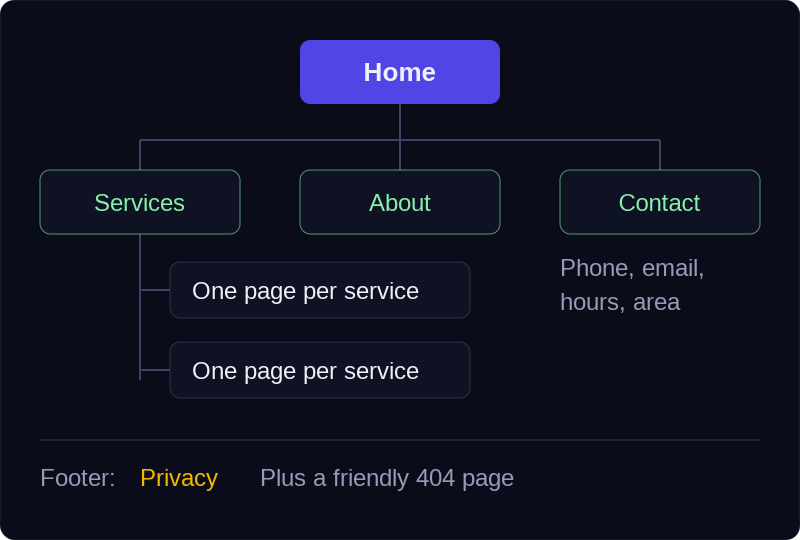
Most small business websites need fewer pages than people think. A customer arrives wanting to know three things: do you do what I need, can I trust you, and how do I reach you. Everything else is optional. In this walkthrough we build a site for a made-up plumbing firm in vagejs, page by page, and explain what each page is for, so you can do the same for your bakery, studio or repair shop.
We built the example with vagejs 0.3.0. The files and output below come from that build.
Start the project
npm create vagejs@latest brightwater
cd brightwater
npm install
npm run dev
The starter includes a blog. If you won't post news, delete src/pages/blog/ and src/layouts/blog.ts. Then set your real details in vage.config.ts:
site: "https://www.example-plumbing.net",
title: "Brightwater Plumbing",
description: "Family plumbing and heating repairs in Northfield, with same-week appointments.",
site is your real web address; it's used for canonical links and the sitemap, the file that lists your pages for search engines. title is added to every page's browser tab.
Page 1: Home
The home page answers "do you do what I need?" in one screen. Say what you do and where, in plain words, and give two obvious next steps. Here's src/pages/index.md:
---
title: Plumbing and heating repairs in Northfield
navTitle: Home
description: Brightwater Plumbing fixes leaks, boilers and radiators in Northfield. Family run since 2009, with same-week appointments.
---

# Plumbing and heating repairs in Northfield

Leaks, boilers and radiators, fixed by a family firm. [See our services](/services/) or [book a visit](/contact/).
Notice the title says what you do and where. That's what people type into a search box, and the title is what they see in the results. A page title of "Home" tells them nothing.
Page 2: Services, and one page per service
A single "Services" page with a short list is fine to start. But if you offer distinct jobs that people search for separately (boiler servicing, leak repairs), each deserves its own page: what it involves, how long it takes, roughly what it costs if you're happy to say, and how to book. In vagejs, a folder does this neatly:
src/pages/services/
├── index.md              → /services/
├── boiler-servicing.md   → /services/boiler-servicing/
└── leak-repairs.md       → /services/leak-repairs/
Give each page its own description. If a page has none, vagejs quietly uses the site description from the config, and the check won't warn you, because the page technically has one. We left it off our leak repairs page as a test, and that page ended up with the site's general description instead of one about leak repairs. Search results work better when each page describes itself.
Page 3: About
This is the "can I trust you" page. Who runs the business, how long you've been doing it, which area you cover, any qualifications or memberships you really hold. A real photo of you or your team does more than any stock image. Don't invent anything here: no made-up reviews, no borrowed logos.
If you add photos, put them in public/images/ and write them in Markdown with real alt text. vagejs fills in each image's width and height from the file, so the page doesn't jump while it loads.
Page 4: Contact
The page that makes you money, so make it easy. Phone and email links work on every phone and need no extra code:
Call [01632 960 123](tel:+441632960123) or email [jobs@example-plumbing.net](mailto:jobs@example-plumbing.net).

| Day | Hours |
| --- | --- |
| Monday to Friday | 8am to 6pm |
| Saturday | 9am to 1pm |
| Sunday | Closed |
Opening hours as a Markdown table come out as a proper HTML table, which is easy to read on a phone and for screen readers. Add your area or address, and keep your business name, address and phone number the same everywhere they appear online.
What about a contact form? Here vagejs is deliberately strict. Forms are removed from page content, so a <form> pasted into Markdown simply disappears (in our test, only the button's text, "Send", was left behind). You can put a form in a layout, which is trusted code, but a form that sends to another website fails vage check until you approve that domain:
error   link-unapproved        /contact/ (src/pages/contact.md)
        Links to forms.example.com (on /contact/) aren't approved in links.lock.json. If the site owner added them on purpose, they approve with "npx vage links approve forms.example.com". Otherwise remove them: unapproved links are how injected spam usually shows up.

Checked 6 page(s): 1 error(s), 0 warning(s).
Passing checks do not guarantee indexing, rankings, rich results or AI citations.
And on Cloudflare and Netlify, the security policy vagejs writes only allows forms to send to your own site (form-action 'self'), so a form posting elsewhere would be blocked by the browser. If you host on Cloudflare Workers, vagejs has its own contact form: set contact: { to, from } in the config, add contactForm(site) to a layout, and each message is emailed to you through Cloudflare Email Routing. For most small businesses, phone and email links are still the simplest answer.
Page 5: Privacy
If you collect anything about visitors (an email address, analytics), you need to say what and why. Keep it short and true to what you actually do. Link to it from the footer. If you're unsure what your local rules require, ask someone qualified; we can't give legal advice.
Also keep the starter's src/pages/404.md. It's the page people see when a link is wrong, so make it helpful: a link home and your phone number.
A menu that keeps itself current
With five or six pages, you could type the menu by hand. But it's nicer when adding a page with an order puts it in the menu automatically. We gave Services, About and Contact order: 1, 2 and 3, and a short navTitle each, then changed the starter's src/layouts/default.ts in three places:
import { html, raw, tree, type Layout } from "vagejs";

const layout: Layout = ({ content, page, site, pages }) => {
  const menu = tree(pages, "/").filter((n) => n.page.frontmatter.order !== undefined);
and inside the <nav>:
        <a href="/">Home</a>
        ${menu.map((n) => html`<a href="${n.page.route}">${n.page.label}</a>`)}
plus a footer with <a href="/privacy/">Privacy</a>. tree() lists the site's top-level pages in order; the filter keeps only those with an order, so the privacy page stays in the footer. The built menu:
      <nav aria-label="Main">
        <a href="/">Home</a>
        <a href="/services/">Services</a><a href="/about/">About</a><a href="/contact/">Contact</a>
      </nav>
Tell search engines who you are
vagejs adds structured data (JSON-LD, a small block of facts that search engines read) to your pages automatically. For a business, add your organization's details in vage.config.ts:
seo: {
  structuredData: {
    organization: {
      name: "Brightwater Plumbing",
      logo: "/images/logo.png",
      url: "https://www.example-plumbing.net",
    },
  },
},
The home page then carries this, from our build:
<script type="application/ld+json">{"@context":"https://schema.org","@graph":[{"@type":"WebSite","name":"Brightwater Plumbing","url":"https://www.example-plumbing.net/"},{"@type":"Organization","name":"Brightwater Plumbing","url":"https://www.example-plumbing.net","logo":"https://www.example-plumbing.net/images/logo.png"}]}</script>There's also a sameAs list for your official profile addresses. Only describe what's true and visible on your site. Structured data helps search engines understand you; it doesn't guarantee any special search result. SEO and AI search covers what else vagejs generates, including robots.txt, the sitemap and llms.txt.
Check, build, publish
Before anything goes live:
npx vage checkOur finished site:
Checked 8 page(s): 0 error(s), 0 warning(s).
Passing checks do not guarantee indexing, rankings, rich results or AI citations.
Then npm run build and deploy. The deployment guide covers GitHub Pages, Cloudflare and Netlify; every deploy shows its plan and asks before it publishes. If you're replacing an old site, list its old page addresses in redirects in the config so existing links and bookmarks still land somewhere useful.
What vagejs doesn't do for a business site
- No booking calendar, shop or payments. Link to a service you trust for those.
- Contact forms only on Cloudflare Workers, as above. On other hosts, use phone and email links.
- No click-on-the-page editor. You or your developer edit Markdown files, in a text editor or the local editor with its live preview, or ask an AI coding agent to; our agent guides show how.
- No reviews widget. If you quote a customer, quote a real one, with permission.
- Analytics is off until you turn it on. When you do, Google's tags start with consent "denied" and you provide the consent banner. See configuration.
Small business site essentials
- Home, Services (plus a page per service), About, Contact, Privacy and a 404 page cover most small businesses.
- Write titles and descriptions that say what you do and where; give every page its own description.
- Use phone and email links for contact; forms are stripped from content and blocked from posting elsewhere on Cloudflare.
order,navTitleandtree()keep the menu current.seo.structuredData.organizationtells search engines your business name, web address and logo, andnpx vage checkcatches broken links before customers do.
Ready? Start with getting started.