On this page
A portfolio has one job: show your best work quickly, to someone who'll give it about thirty seconds. That makes it a demanding kind of website. It's mostly large images, it's often opened on a phone from a link in an email, and it has to stay easy to update when you finish a new project. In this walkthrough we build one with vagejs: a work index that sorts itself, project pages with fields the build checks for you, and images that come in phone-sized copies.
We built the example below, a portfolio for a made-up designer called Alex Moreno, with vagejs 0.3.0. The files and terminal output are from that run.
The plan
Four kinds of pages:
- Home: who you are, in two sentences.
- Work (
/work/): every project, newest first. - One page per project (
/work/<name>/): the client, the year, your role, a few words and the pictures. - About: a short bio and how to reach you.
Start with a new site:
npm create vagejs@latest alex-portfolio
cd alex-portfolio
npm install
npm install --save-dev sharp
sharp is the image library vagejs uses to make the smaller copies of your photos. You'll turn that on in Step 4. The starter comes with a blog; if you don't want one, delete src/pages/blog/ and src/layouts/blog.ts, and change the "Blog" link in src/layouts/default.ts to <a href="/work/">Work</a>.
Step 1: Give every project the same fields
Project pages should all have the same facts: client, year, role. With vagejs, a layout can declare the fields its pages must have, and the build refuses any page that gets them wrong. Create src/layouts/project.ts:
import { z, type Layout } from "vagejs";
import defaultLayout from "./default.ts";

// Fields every project page must have. A typo or a missing year fails the build.
export const frontmatter = z.object({
  client: z.string(),
  year: z.number().int(),
  role: z.string(),
});

const layout: Layout = (props) => defaultLayout(props);
export default layout;
This layout looks exactly like the default one; its only job is the field list. z is a small validation library (Zod) that vagejs re-exports for exactly this. Templates and layouts covers layout fields in more depth.
Step 2: Write a project page
Put your images in public/images/work/, then write src/pages/work/trail-maps.md:
---
title: Coastal trail maps
description: Folding walking maps for a coastal path charity, designed to be read in the rain and on a phone screen.
layout: project
client: Coast Path Trust
year: 2024
role: Cartography and layout
---
# Coastal trail maps
Four maps, one style.
Write real alt text. It's what screen readers read aloud, and it's what search engines and AI tools understand about the picture. vage check fails on any image with no alt at all.
Now the payoff. We misspelled year as yaer on one project, and the check caught it:
error   page-error             src/pages/work/cafe-menus.md
        Frontmatter doesn't match the "project" layout's fields:
✖ Unrecognized key: "yaer"
✖ Invalid input: expected number, received undefined
  → at year

Checked 7 page(s): 1 error(s), 0 warning(s).
Passing checks do not guarantee indexing, rankings, rich results or AI citations.
One more trap we fell into, and so might you. A description with a colon in it, like A new identity for a small ferry company: logo, timetable design and signs, isn't valid YAML (the format frontmatter is written in). The check stopped us:
error   page-error             src/pages/work/harbour-rebrand.md
        Invalid YAML frontmatter: Nested mappings are not allowed in compact mappings at line 2, column 14:

description: A new identity for a small ferry company: logo, timetable design a…
             ^
The fix is to wrap the value in double quotes: description: "A new identity for a small ferry company: logo, ...".
Step 3: A work index that sorts itself
Create src/layouts/work.ts:
import { collection, html, raw, type Layout } from "vagejs";
import defaultLayout from "./default.ts";

// The work index: every project, newest year first.
const layout: Layout = (props) => {
  const projects = collection(props.pages, {
    under: "/work/",
    sort: (a, b) => Number(b.frontmatter.year) - Number(a.frontmatter.year),
  });
  const list = html`<ul>${projects.map(
    (p) => html`<li><a href="${p.route}">${p.title}</a>: ${p.frontmatter.client}, ${p.frontmatter.year}. ${p.description}</li>`,
  )}</ul>`;
  return defaultLayout({ ...props, content: String(html`${raw(props.content)}${list}`) });
};

export default layout;
And src/pages/work/index.md with layout: work in its frontmatter. collection() picks every page under /work/ (but not the index itself), and our own sort function puts the newest year first. Add a project file and it appears in the list; delete one and it's gone. Nobody edits a list by hand, so the list can't fall out of date.
Step 4: Make the images phone-friendly
Portfolio photos are big, and phones don't need all those pixels. Add one line to vage.config.ts:
images: { optimize: true },For each image in your page content, vagejs now makes resized WebP copies (480, 960 and 1600 pixels wide by default) and lists them in srcset. The browser picks the one that suits the screen. Here's the image from our trail maps page after the build:
<img src="/images/work/trail-maps.jpg" alt="A folded trail map open on a picnic table, showing the cliff path in orange" srcset="/_vage/img/trail-maps-cabf321c7e-480.webp 480w, /_vage/img/trail-maps-cabf321c7e-960.webp 960w, /_vage/img/trail-maps-cabf321c7e-1600.webp 1600w" sizes="(max-width: 48rem) 100vw, 48rem" width="2400" height="1600" decoding="async">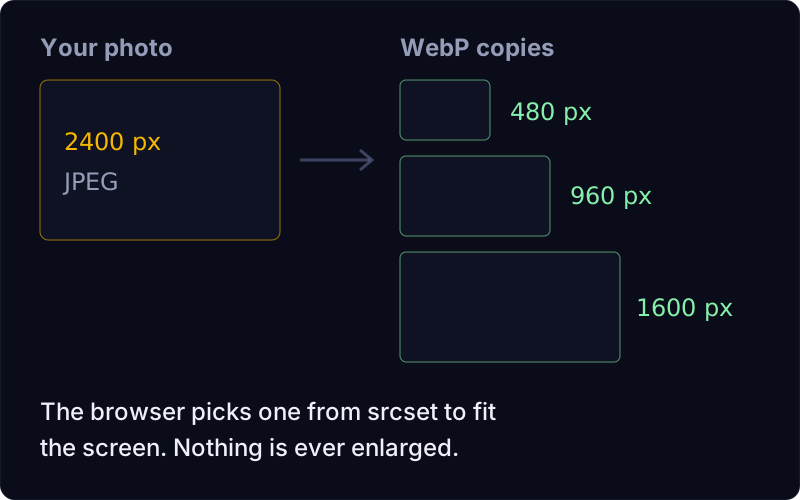
A few details are worth knowing:
- Width and height are filled in from the file, so the browser saves the right amount of space and the page doesn't jump as photos arrive. This works even without
optimize. - The first image loads straight away; later ones are lazy-loaded, so they wait until the visitor scrolls near them.
- Nothing is enlarged. A photo narrower than a copy size simply doesn't get that copy.
- Copies are cached between builds, so rebuilding a big portfolio stays quick.
You can change the sizes, quality and sizes attribute under images in the config; see configuration.
Step 5: Check the page weight
npx vage audit builds the site and measures every page against size budgets. We deliberately used heavy 2,400-pixel test images (about 2.8 MB each) to see what happens. Here's the start of the output:
  /                            total    1.6 KB  js 0.0 KB  css 0.0 KB  img 0.0 KB  font 0.0 KB  1 req
  /about/                      total    1.4 KB  js 0.0 KB  css 0.0 KB  img 0.0 KB  font 0.0 KB  1 req
  /work/                       total    2.0 KB  js 0.0 KB  css 0.0 KB  img 0.0 KB  font 0.0 KB  1 req
  /work/cafe-menus/            total 2853.1 KB  js 0.0 KB  css 0.0 KB  img 2851.2 KB  font 0.0 KB  2 req
  /work/harbour-rebrand/       total 2852.2 KB  js 0.0 KB  css 0.0 KB  img 2850.2 KB  font 0.0 KB  2 req
  /work/trail-maps/            total 2851.9 KB  js 0.0 KB  css 0.0 KB  img 2850.0 KB  font 0.0 KB  2 req
  /404/                        total    1.4 KB  js 0.0 KB  css 0.0 KB  img 0.0 KB  font 0.0 KB  1 req

warning budget                 /work/cafe-menus/
        image is 2851.2 KB, over the 500 KB budget (performance.budgets.imageKb).
warning budget                 /work/cafe-menus/
        total is 2853.1 KB, over the 1000 KB budget (performance.budgets.totalKb).
The same two warnings follow for the other two projects, then some general notes. Notice the js 0.0 KB column: the portfolio ships no JavaScript at all.
Be aware of one honest quirk here. In 0.3.0, the audit measures the original file named in the image's src, even when optimize is on and browsers download a smaller WebP copy instead. So these warnings overstate what a phone actually downloads. Since 0.4, the audit counts the largest copy a browser would load instead, so its numbers match what visitors download. Either way, the practical fix is the one that helps everyone anyway: export your photos at a sensible size (2,000 pixels wide is plenty for most layouts) before you add them.
Step 6: About and contact
src/pages/about.md is plain Markdown. For contact, ordinary email and phone links work and pass the check:
Email [hello@alexmoreno.example.net](mailto:hello@alexmoreno.example.net) or call [+44 20 7946 0000](tel:+442079460000).Links to other websites (your social profiles, say) need approving once in links.lock.json with npx vage links approve <domain>. That's vagejs's protection against spam links; security explains why.
What won't vagejs do for a portfolio?
- No lightbox or carousel. Click-to-zoom galleries and sliders need JavaScript. vagejs doesn't include one; you can add a script to a layout, at the cost of page weight.
- Only images in page content are optimized. If a layout writes its own
<img>tags (say, cover thumbnails on the work index), those aren't resized, and you should give themwidthandheightyourself. - AVIF is one more setting. Since 0.4,
images: { optimize: true, avif: true }also makes AVIF copies and offers them first, with WebP as the fallback. - No contact form in page content. Forms are removed from Markdown for safety. On Cloudflare Workers, vagejs has a built-in contact form for a layout; elsewhere, use email and phone links, or link to a form service you trust.
- Video embeds belong in a layout, not in Markdown, because iframes are stripped from content.
Portfolio build checklist
- A layout with
export const frontmatter = z.object(...)makes the build check every project's client, year and role. collection()with a sort function gives you a work index that's never out of date.images: { optimize: true }plussharpmakes 480, 960 and 1600 pixel WebP copies withsrcset, and every local content image gets width and height.vage auditmeasures each page; in 0.3.0 it counts the original image, so resize big photos before adding them.- Quote any frontmatter value with a colon in it.
Want to try it? Getting started has you running in a minute, and the content authoring guide covers images in more detail.