On this page
A blog sounds simple until you maintain one. The index page needs updating every time you post. The home page's "latest posts" box shows last spring's news. The RSS feed, if there is one, came from a plugin nobody remembers installing. In this walkthrough we'll set up a blog in vagejs where new posts appear everywhere on their own: on the blog index, on the home page and in an RSS feed.
We built this exact setup with vagejs 0.3.0 for a made-up bakery. The commands, files and output below come from that test project.
Does a new vagejs site already have a blog?
A new vagejs site already has a blog. npm create vagejs@latest gives you src/pages/blog/index.md (the blog's front page) and a layout, src/layouts/blog.ts, that lists every page under /blog/, newest first. So the first step is simply writing a post.
npm create vagejs@latest corner-bakery
cd corner-bakery
npm install
npm run dev
Step 1: Write a post
Each post is a Markdown file in src/pages/blog/. The file name becomes the address, so src/pages/blog/sourdough-starter.md is published at /blog/sourdough-starter/.
---
title: How we keep our sourdough starter alive
description: The feeding schedule, flour and kitchen temperature we use to keep a ten-year-old sourdough starter healthy.
type: article
author: Priya Nair
datePublished: 2026-09-02
image: /images/starter.png
---

# How we keep our sourdough starter alive

Twice a day, every day.
What each field does:
titleanddescriptionappear in search results, social previews, the blog index and the feed.datePublisheddecides the order. Posts without a date go to the end of the list.type: article,authorandimagegive the post Article structured data, which helps search engines understand it's a dated article by a named person. Only use a real author and a real date.
Save, and the post shows up on /blog/ in the dev server. You never edit a list of posts by hand. The content authoring guide lists every frontmatter field.
Step 2: Turn on the RSS feed
RSS is a simple, decades-old format that lets people follow your blog in a feed reader without signing up for anything. In vagejs it's one line in vage.config.ts:
import { defineConfig } from "vagejs";

export default defineConfig({
  site: "https://www.example-bakery.net",
  title: "Corner Bakery",
  description: "Bread, pastries and notes from a small neighbourhood bakery.",
  seo: {
    feeds: [{ under: "/blog/", title: "Corner Bakery journal", limit: 10 }],
  },
  security: { outboundLinks: "require" },
});
under is the section whose pages go in the feed. title is optional; without it, the feed uses your site's title. limit is how many recent posts to include; the default is 20.
The site line matters here. A feed needs full addresses, so without site vagejs skips it and tells you why:
Warning: seo.feeds: the feed for /blog/ needs "site" in vage.config.ts and was skipped.With site set, npm run build lists the feed among the files it writes:
  /                              -> index.html
  /about/                        -> about/index.html
  /blog/                         -> blog/index.html
  /blog/autumn-menu/             -> blog/autumn-menu/index.html
  /blog/sourdough-starter/       -> blog/sourdough-starter/index.html
                                 -> robots.txt
                                 -> sitemap.xml
                                 -> blog/feed.xml
                                 -> llms.txt

Built 5 page(s) into ./dist in 406ms
What's in the feed?
Here's the start of the blog/feed.xml our test build produced, with the newer of the two posts:
<?xml version="1.0" encoding="UTF-8"?>
<rss version="2.0" xmlns:atom="http://www.w3.org/2005/Atom">
  <channel>
    <title>Corner Bakery journal</title>
    <link>https://www.example-bakery.net/blog/</link>
    <description>Posts from this site, newest first.</description>
    <language>en</language>
    <atom:link href="https://www.example-bakery.net/blog/feed.xml" rel="self" type="application/rss+xml" />
    <lastBuildDate>Thu, 01 Oct 2026 00:00:00 GMT</lastBuildDate>
    <item>
      <title>Our autumn menu is here</title>
      <link>https://www.example-bakery.net/blog/autumn-menu/</link>
      <guid isPermaLink="true">https://www.example-bakery.net/blog/autumn-menu/</guid>
      <description>Pumpkin loaves, apple turnovers and the return of the cardamom bun, from the first week of October.</description>
      <pubDate>Thu, 01 Oct 2026 00:00:00 GMT</pubDate>
    </item>
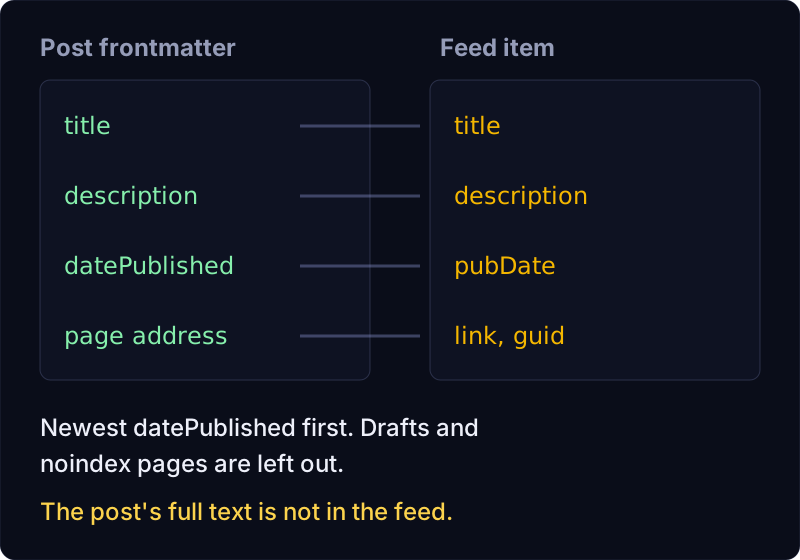
The channel description came from the blog index page's own description, since we didn't set one in the config. Each item takes its title and summary from the post's frontmatter, and its date from datePublished. The feed's dates come only from frontmatter, so building twice gives the same file.
vagejs also adds a discovery link to the <head> of the blog index and every post, so browsers and feed readers can find the feed from any post's address:
<link rel="alternate" type="application/rss+xml" title="Corner Bakery journal" href="https://www.example-bakery.net/blog/feed.xml" />Pages outside /blog/, such as your home page, don't get that link. If you want a visible "Follow with RSS" link elsewhere, add it yourself, as we do next.
Step 3: Show the latest posts on the home page
Create src/layouts/home.ts:
import { collection, html, raw, type Layout } from "vagejs";
import defaultLayout from "./default.ts";

// Home page: the page's own text, then the three newest posts.
const layout: Layout = (props) => {
  const latest = collection(props.pages, { under: "/blog/", sort: "date", limit: 3 });
  const list = html`<h2>Latest posts</h2>
<ul>${latest.map((p) => html`<li><a href="${p.route}">${p.title}</a> <time datetime="${p.frontmatter.datePublished}">${p.frontmatter.datePublished}</time></li>`)}</ul>
<p><a href="/blog/feed.xml">Follow with RSS</a></p>`;
  return defaultLayout({ ...props, content: String(html`${raw(props.content)}${list}`) });
};

export default layout;
Then add layout: home to the frontmatter of src/pages/index.md. collection() picks the pages under /blog/, sorts them newest first and keeps three. It leaves out the blog index page itself, so you only get posts. The layout reuses the starter's default.ts for the header and styles. Templates and layouts explains html, raw and collection() in more detail.
Our check after these changes:
Checked 6 page(s): 0 error(s), 0 warning(s).
Passing checks do not guarantee indexing, rankings, rich results or AI citations.
Step 4: Write ahead with drafts
Add draft: true to a post's frontmatter and it's left out of the build, the blog index, the home page list and the feed. It still shows in npm run dev, so you can preview it.
The check has your back if you link to a draft by mistake. We linked to the autumn menu post while it was still a draft:
error   link-broken            /blog/sourdough-starter/ (src/pages/blog/sourdough-starter.md)
        Link to "/blog/autumn-menu/" points to a draft page, which is not published.

Checked 5 page(s): 1 error(s), 0 warning(s).
Passing checks do not guarantee indexing, rankings, rich results or AI citations.
Remove draft: true when you're ready, rebuild and deploy. vagejs has no built-in scheduler, so "publishing" means removing the line and deploying on the day (or writing a small CI job that does it for you).
What doesn't the feed do?
So you're not surprised later:
- Summaries only. Each item carries the post's
description, not the full text. Readers click through to read the post on your site. - RSS 2.0 only. vagejs writes RSS. It doesn't write Atom or JSON Feed files.
- One feed per section. A feed covers everything under a folder like
/blog/. You can list several sections infeeds(say/blog/and/news/), but there's no automatic per-tag or per-author feed. - No email newsletter. A feed is a file people can subscribe to; sending posts by email needs a separate service.
- Your site address must be set, as we saw above, because feed links have to be absolute.
Blog and feed recap
- Posts are Markdown files in
src/pages/blog/; the starter's blog index lists them, newest first. seo: { feeds: [{ under: "/blog/" }] }writes/blog/feed.xmland links it from every page in the blog.- A short layout with
collection()puts the latest posts on your home page. draft: truekeeps a post out of everything until you're ready, andvage checkcatches links to it.- Feeds hold summaries, not full posts, and need
siteset.
Ready to start? Getting started takes a minute, and the configuration guide has the rest of the seo options.