On this page
You hand over a clean, carefully built website. A week later the client emails: "I just updated the services page, can you check it looks OK?" It doesn't. The heading is bright red and three times the size of everything else. One paragraph is in a font you've never seen. A table pasted from a spreadsheet pushes the whole page sideways on phones, and somewhere near the bottom there's an embedded widget nobody remembers adding.
Nobody did anything wrong on purpose. The client edited their own content, which is exactly what they're supposed to do. The trouble is that their edit reached further than their content. This post explains why that happens on so many sites, and how vagejs is built so that editing words can't rearrange the design.
Why does a simple text edit break the design?
On most websites, the words and the design end up stored in the same place. When someone pastes text into a rich text editor, they rarely paste only text. A word processor or an email puts hidden formatting into the clipboard: font names, sizes, colors, fixed widths, sometimes whole layout tables. The editor faithfully keeps it, and that formatting becomes part of the page.
These leftovers usually arrive as inline styles: little pieces of design attached directly to one paragraph, like style="font-size:48px;color:red". Inline styles win over the site's stylesheet, so the carefully chosen fonts and spacing lose to whatever came along with the paste.
Page builders add a second way to break things. When a client can drag columns around, change a section's background or resize an image by hand, every content edit is also a design edit. That's the whole appeal of a builder, and it's also why a quick Friday update can leave the homepage looking different on Monday.
Then there's embedded code. Many editors let people paste HTML: a booking widget, a social feed, a snippet from a marketing tool. Those can load scripts, add pop-ups or slow the page down, and they usually bypass whatever review the original site went through.
How do you keep content and layout apart?
The lasting fix isn't asking clients to be more careful. It's making the design something content edits can't reach. In practice that means three things:
- Content is plain text with simple structure. Headings, paragraphs, lists, links, images. No fonts, no colors, no pixel widths.
- Design lives in one place that the site's builder controls, and applies to every page the same way.
- Anything that would change the design from inside the content is stripped out, automatically, before the page is published.
This idea is old and well understood. What's often missing is a tool that enforces it, so it holds up after the person who set it up has moved on to the next project.
How vagejs separates the two
vagejs is a static site generator: it turns a folder of text files into a finished website ahead of time. It's built around the split above.
Content is Markdown
Every page is a Markdown file in src/pages/. Markdown is a plain-text format where # makes a heading, **bold** makes bold text and a blank line starts a new paragraph. There's no menu for fonts or colors, because Markdown has no way to express them. A services page looks like this:
---
title: Our services
description: What we offer and how to book.
---

# Our services

We fix bikes. **Book a service** any weekday.
The part between the --- lines is called frontmatter: a few labelled fields such as the title and the description search engines show. The rest is the page.
Design lives in layouts
The HTML around each page (header, menu, footer, fonts, colors) comes from a layout, a file in src/layouts/. Pages pick one with layout: in their frontmatter, or get the default. The client edits Markdown; the person who builds the site edits layouts. One changes what the page says, the other changes how every page looks.
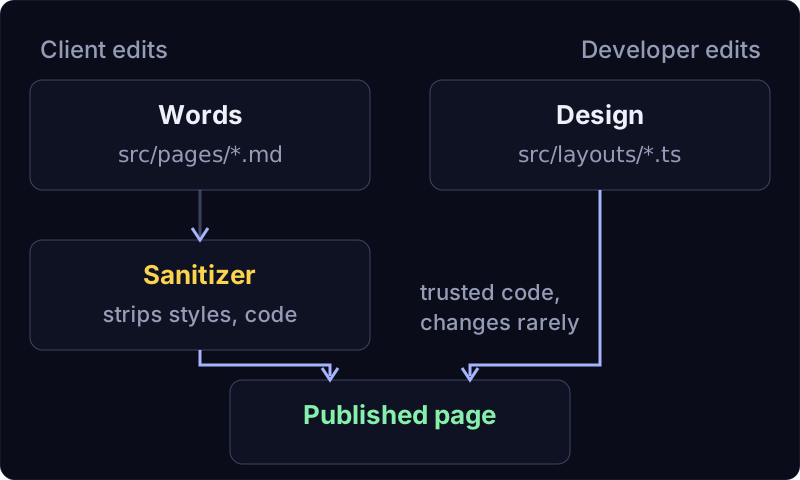
Pasted HTML is cleaned before it's published
Markdown does allow some HTML, and clients will paste it. So vagejs runs every page's content through a sanitizer (a filter that removes anything unsafe or out of place) before the layout ever sees it. It removes:
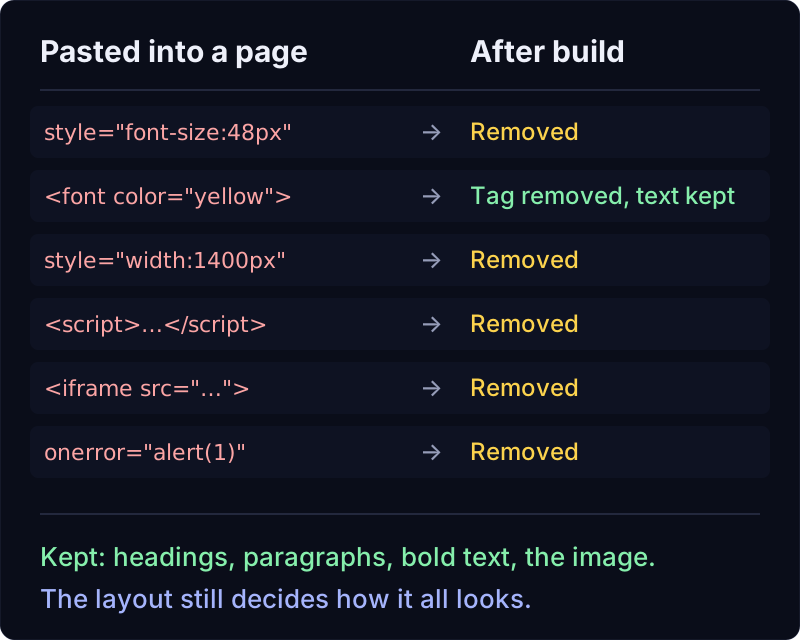
style="..."attributes, so pasted fonts, colors and widths have no effect- old formatting tags like
<font>,<center>and<marquee> <style>blocks, scripts and event handlers such asonerror=- iframes and forms, the usual way widgets and embeds sneak in
javascript:links
We tried this ourselves with vagejs 0.3.0 on 24 October 2026. We pasted a messy block into a page in a fresh starter site: a red 48-pixel line of text, a <font> tag, a <div> forced to 1400 pixels wide, a script, an iframe and an image with an onerror handler. After npm run build, this is what the page content became:
<h1>Our services</h1>
<p>BIG SALE THIS WEEK!!!</p><p>Call us today</p>
<div>Pasted from a word processor</div><img src="/favicon.svg" alt="Logo" width="120" height="120" decoding="async"><p>We fix bikes. <strong>Book a service</strong> any weekday.</p>
The words survived. The styling, the script and the iframe didn't. The image even gained its real width and height, read from the file, so it won't make the page jump while loading. And the site's own design still decides how all of it looks.
There's a second reason inline styles are removed: they're the most common way attackers hide spam links on a hacked site (a link styled to be invisible). Stripping them protects the design and the site's reputation at the same time.
Structured fields can't be mistyped
Some content has a fixed shape. A service has a price; a team member has a role; an event has a date. Instead of letting clients type "£45" somewhere in the middle of a paragraph and style it themselves, a layout can declare the fields it expects, and vagejs checks every page that uses it.
// src/layouts/service.ts
export const frontmatter = z.object({
  price: z.string(),
  duration: z.string().optional(),
});
The layout decides where the price goes and how it looks. The client only fills in the value. If they make a typo, the site doesn't publish a half-broken page. We misspelled price as prise in a test page, and here's what npx vage check printed:
error   page-error             src/pages/tune-up.md
        Frontmatter doesn't match the "service" layout's fields:
✖ Unrecognized key: "prise"
✖ Invalid input: expected string, received undefined
  → at price

Checked 7 page(s): 1 error(s), 1 warning(s).
The warning in that run is the starter's placeholder domain, which we hadn't changed. npm run build stops on the same error and names the file, so a typo becomes a message instead of a broken page on the live site. More on this in templates and layouts.
What editing looks like for a client
Day to day, a client (or whoever looks after the content) opens a Markdown file, changes the words, and saves. npm run dev shows the result in a browser and reloads when they save. npm run check looks for broken links, missing titles and descriptions and other mistakes before anything goes live, and nothing they write in a content file can change the fonts or the spacing.
Many people now make these edits through an AI coding assistant ("change the opening hours on the contact page"). Every vagejs site includes an AGENTS.md file that tells assistants the rules, including that content gets sanitized and that styling belongs in layouts. See our guides for AI coding agents and the content authoring docs.
Paste messy text into a test page
You need Node.js 22.12 or newer:
npm create vagejs@latest my-site
cd my-site
npm install
npm run dev
Open src/pages/about.md, paste something messy from a word processor, and look at the page. Then run npm run check before you publish. The getting started guide walks through the rest.
What this approach asks of you
It's worth being clear about what this approach doesn't do.
- There's no click-on-the-page editor. Clients edit text files, either directly, through GitHub's website, in vagejs's local editor (forms and a live preview, on their own computer), or by asking an AI assistant. For someone who only ever wants to click on the page and type, that's a real change. Editing on the live site is on the roadmap for later.
- Content can still be awkward. A table with twelve columns or a huge photo will still be a table with twelve columns and a huge photo. The sanitizer removes styling and code; it doesn't judge taste. Plain HTML like
<div>andclass=attributes also stay, so a determined author can still reach for the layout's CSS classes. - The owner can switch protection off.
markdown: { inlineStyles: true }keeps inline styles, andmarkdown: { html: "allow" }trusts all HTML in content. Both exist for sites where every author is trusted. If clients edit your site, leave them off. - Widgets need a different home. Because iframes and forms are removed from content, a booking widget or contact form has to go in a layout, which is trusted code that a developer or careful assistant writes once. That's deliberate, but it's an extra step.
- Layouts are code. Someone has to write and maintain them. The payoff is that they change rarely, while content changes every week.
Content and layout apart: the takeaways
- Layouts break when content edits carry design with them: inline styles from pasted text, page-builder controls and embedded code.
- The fix is to keep content (words and structure) apart from layout (how every page looks), and to enforce it automatically.
- In vagejs, content is Markdown, design lives in layouts, and pasted styles, scripts, iframes and forms are stripped before publishing.
- Layouts can declare fields like
price, so a typo stops the build with a clear message instead of reaching the live site. - There's no click-on-the-page editor, and widgets belong in layouts. For many small sites, that trade is worth a design that stays put.