On this page
- Why could only one person update it?
- What does a handover-proof site need?
- Content is just files
- Instructions are part of the site
- You can look things up instead of guessing
- "Done" is something a machine can confirm
- History you can read and undo
- What a handover still needs from people
- What makes a site easy to hand over
- Read the handover note in a new site
The opening hours on the website are wrong. Everyone knows. Someone mentions it in a meeting every few weeks, and every time the answer is the same: "Sam used to do that." Sam built the site three years ago, kept it running as a favor, and then moved to another job. Now nobody's sure where the site lives, how to log in, or whether changing one line will break something else.
If that sounds familiar, you're far from alone. A website that only one person understands works fine right up until that person isn't around. This post looks at why sites end up that way, what a handover-proof site needs, and how vagejs is designed so the next person (or the next AI assistant) can pick up where the last one left off.
Why could only one person update it?
It's rarely because the developer was secretive. It's because the important knowledge never got written down. A typical small-business site depends on a handful of things that live in one person's head:
- Where the content is. In a database? In a page builder? Spread across theme files and a plugin's settings screen?
- How changes go live. Is there a staging copy? A build step? A server someone logs into by hand?
- What's safe to touch. Which plugin is holding the contact form together, and which update broke the menu last time?
- The accounts. Domain registrar, hosting, the code repository, analytics. Often registered to a personal email address.
None of that is visible from the website itself. When the person leaves, the site doesn't stop working. It just stops changing, and every small edit turns into a project.
What does a handover-proof site need?
You can't make knowledge transfer free, but you can make a site that explains itself. It comes down to five things:
- Content in plain files that anyone can open, read and edit with ordinary tools.
- Written instructions inside the project, not in an old email thread.
- A way to look things up (commands, settings, valid fields) instead of guessing.
- A check that says "done", so a newcomer knows when a change is safe to publish.
- History, so you can see what changed, when, and undo it.
vagejs builds all five into every new site.
Content is just files
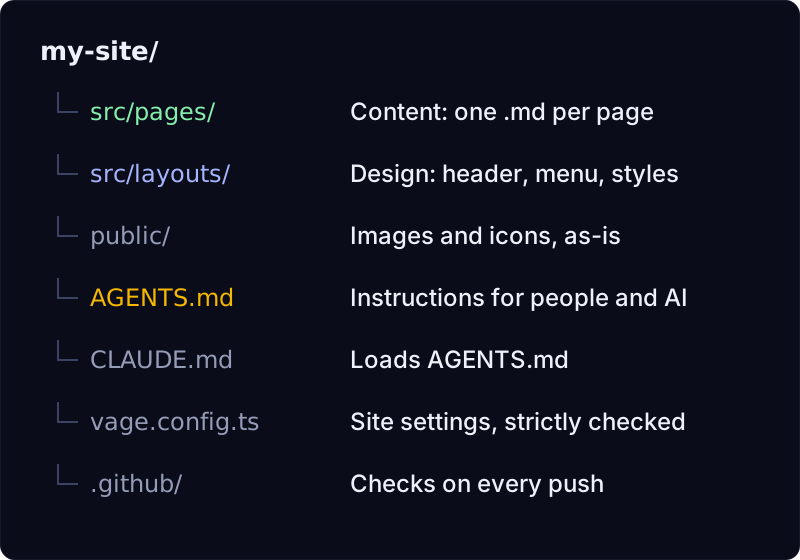
In a vagejs site, every page is a Markdown file in src/pages/. The file name becomes the address: src/pages/about.md is the /about/ page, and src/pages/blog/first-post.md is /blog/first-post/. To change the opening hours, you open the contact page's file in any text editor and change the words. There's no database to export and no admin screen whose password nobody has.
Markdown is a small, plain-text format. # starts a heading, **bold** is bold, a blank line starts a new paragraph. It takes a few minutes to learn and reads fine even if you never learn it. The design lives separately, in layout files under src/layouts/, so editing words can't rearrange the page.
Instructions are part of the site
Every site made with npm create vagejs@latest includes an AGENTS.md file at the top of the project. It's written for AI coding assistants, but it reads just as well for a person: the everyday commands, how to add a page or a blog post, every frontmatter field (the labelled settings at the top of each page), how to rename a page without breaking links, and what "done" means.
It also says what not to do. Don't invent titles, dates or facts; ask the owner. Don't publish or deploy without asking first. Don't add links to other websites the owner didn't ask for. Those rules matter more, not less, when the person making the change is new.
There's also a CLAUDE.md, a tiny file that pulls in AGENTS.md for Claude Code. Many other assistants, including Cursor and Codex, read AGENTS.md directly. We have short setup notes for Claude Code, Cursor, Codex and others.
You can look things up instead of guessing
A newcomer's biggest risk is guessing: a config option that doesn't exist, a frontmatter field with a typo. vagejs answers those questions from the tool itself. Here's npx vage info in a fresh starter site (vagejs 0.3.0, run on 24 October 2026):
vagejs 0.3.0

  vage create <dir>            Scaffold a new vagejs website
  vage dev                     Start the dev server with live reload
  vage build                   Build the static site into dist/
  vage check                   Check SEO, links, structured data and basic accessibility (writes nothing)
  vage audit                   Performance budgets and accessibility (local build), or PageSpeed/CrUX for a deployed --url
  vage preview                 Serve the production build from dist/
  vage info                    Describe commands, config and frontmatter (use --json for agents)
  vage deploy:github           Check, build, then safely commit and push the project to GitHub (asks first)
  vage deploy                  Deploy: GitHub Pages (workflow + push, waits for GitHub), Cloudflare Workers (new version, no downtime) or Cloudflare Pages
  vage connect <service>       Connect Search Console (gsc) or Analytics (ga4) via OAuth, or save your own PageSpeed / CrUX API key (pagespeed, crux)
  vage disconnect <provider>   Remove a stored connection: google (revokes OAuth), pagespeed or crux (saved API key)
  vage links [action] [...domains] List the external domains the site links to; the site owner approves them into links.lock.json (asks first)
  vage verify                  Compare the live site with your files (extra links, scripts, text or sitemap pages mean it was changed outside your repository), and check search and AI crawlers can reach it
  vage report <kind>           Report from Search Console (search) or GA4 (analytics); needs vage connect
  vage indexnow                Notify IndexNow search engines about changed URLs (asks first)
  vage guidelines              Show the rule pack: provider facts in use, their official sources, and the changelog

Config: vage.config.ts | vage.config.js | vage.config.mjs. Pages: src/pages/**/*.md
Run `vage info --json` for full config and frontmatter JSON Schemas.
npx vage info --json goes further: every command and option, plus the full rules (JSON Schemas) for vage.config.ts and for page frontmatter. An AI assistant can read that and know exactly which settings exist, rather than inventing one that sounds plausible. The settings file is strict too: an unknown key in vage.config.ts is an error, so a typo is caught instead of silently doing nothing.
"Done" is something a machine can confirm
The hardest question for someone new is "did I break anything?" vagejs gives a concrete answer:
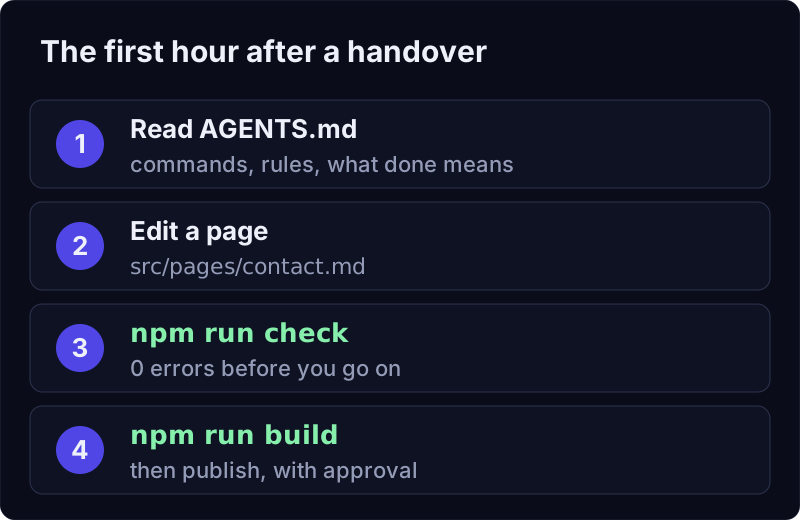
npm run check   # broken links, missing titles and descriptions, structured data, basic accessibility
npm run build   # builds the finished site into dist/ and stops on any error
AGENTS.md defines done the same way: npm run check reports 0 errors and npm run build succeeds. If a page links to something that doesn't exist, or a page is missing its title, the check says which file and what's wrong. New sites also come with a GitHub Actions workflow that runs check, build and audit on every push, so a broken change shows up even if someone forgets to run it.
History you can read and undo
Plain files work well with git, the version history tool most developers use. If the site's in a git repository, every change is recorded with who made it and when:
git log --oneline -- src/pages/contact.md   # every change to the contact page
git show <commit>                           # what exactly changed
git revert <commit>                         # undo one change safely
If the project isn't in git yet, npx vage deploy:github will set it up: it runs the check and the build, shows you exactly which files it would commit, refuses files that look like credentials or API keys, asks before doing anything, and never force-pushes over someone else's work. Add --dry-run to see the plan without changing a thing. The deployment docs cover the options.
What a handover still needs from people
Being honest about the limits matters here, because some of the problem isn't technical at all.
- Accounts and passwords. vagejs can't recover access to a domain registrar, a hosting account or a code repository. If those are in a former developer's name, that's a conversation with them or with the provider. Put these accounts under a shared business email and turn on two-factor sign-in.
- Your current site isn't magically portable. If today's site runs on a database-driven CMS or a website builder, moving to vagejs means copying the content into Markdown files. It's usually straightforward for a small site, but it's real work.
- Custom layouts are still code. The starter's layouts are short and commented, but a developer can write layouts as elaborate as they like. If they did, someone will need to read TypeScript to change the design. Content edits never need that.
- AI assistants need a reviewer.
AGENTS.mdandvage infomake an assistant far less likely to guess, andnpm run checkcatches many mistakes. A person should still read the change before it goes live. - Someone still has to own it. Files and history make handovers easy. They don't replace having a named person who looks after the site.
What makes a site easy to hand over
- Sites get stuck when the knowledge to change them lives in one person's head: where content is, how it goes live, what's safe to touch.
- A handover-proof site keeps content in plain files, instructions in the project, answers in the tool, a clear definition of done, and full history.
- vagejs pages are Markdown files; every site ships with
AGENTS.md;vage info --jsondescribes every command and setting;npm run checkandnpm run buildconfirm a change is safe. - It can't recover lost accounts or replace having someone responsible. Sort out access first, then make the site easy to hand over.
Read the handover note in a new site
If you're starting fresh or planning a move, you'll need Node.js 22.12 or newer:
npm create vagejs@latest my-site
cd my-site
npm install
npm run dev
Then open AGENTS.md and read it, even if you never use an AI assistant. It's the handover note your current site never had. The getting started guide and the CLI reference cover the rest, and our prompt library has ready-made requests for common edits.