On this page
- First, the honest part
- How does a page get into Google?
- Cause 1: the words only appear after JavaScript runs
- Cause 2: a "do not index" sign left switched on
- Cause 3: your sitemap and canonical tags point somewhere else
- Cause 4: every page looks the same
- How vagejs avoids these by design
- After launch: ask Google directly
- What vagejs can't do about indexing
- Why sites go missing from Google, in short
- Check your own site before it launches
You described your business to an AI tool, and an afternoon later you had a website. It looked great. You sent the link to friends, put it in your email signature, maybe printed it on a flyer. Two weeks later you type your business name into Google and get your competitor, a directory listing, and a page of things that aren't you.
It's a horrible feeling, and it's very common. Let's go through why it happens, how to check each cause yourself, and how vagejs is built to catch most of them before your site goes live.
First, the honest part
No tool can make Google index a page. Google decides what to crawl, what to keep and how to rank it, and a brand-new domain with no links pointing at it can take a while to be noticed at all. Anyone who promises "page one in a week" is guessing.
But "Google hasn't got round to me yet" and "Google can't read my site" are very different problems. The first fixes itself with time and good content. The second doesn't fix itself ever. Most of the causes below are the second kind, and every one of them is checkable.
How does a page get into Google?
It helps to picture the trip a page takes:
- Discovery. Google learns your page's address, from a link on another site, a sitemap, or Search Console.
- Crawling. Googlebot downloads the page, if your
robots.txtfile allows it. - Rendering. If the page needs JavaScript to show its content, Google runs it in a headless browser. Google's own documentation says pages wait in a queue for this, sometimes a few seconds, sometimes longer.
- Indexing. Google reads the result and decides whether to store it, unless the page says
noindex.
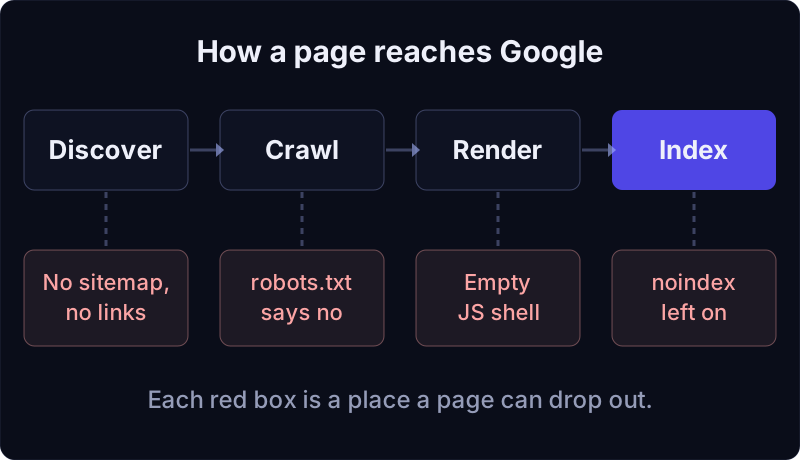
A page can fall out at any step. Here are the usual ways AI-built sites do.
Cause 1: the words only appear after JavaScript runs
Many AI app builders produce what developers call a single-page app. The HTML your server sends is almost empty, a shell with a <div id="root"> and a script tag. The script then builds the page in the visitor's browser.
People with modern browsers never notice. Search engines have more work to do. Google does render JavaScript, but it does it in a second pass, when it has resources free, and it won't render scripts from files or pages that are blocked to it. Google's guide to JavaScript SEO still calls server-side rendering or pre-rendering "a great idea" because it's faster for people and crawlers, and because not all bots can run JavaScript.
How to check: open your site, right-click, and choose "View page source" (not "Inspect"). If you can't find your headline and paragraphs in that raw text, crawlers start with an empty page too.
Cause 2: a "do not index" sign left switched on
While a site is being built, it's sensible to hide it from search engines. The trouble is remembering to undo that. Two common leftovers:
- A
<meta name="robots" content="noindex">tag in every page's head. - A
robots.txtwithUser-agent: *andDisallow: /, which asks every crawler to stay away from the whole site.
How to check: visit yoursite.com/robots.txt, and search your page source for noindex.
Cause 3: your sitemap and canonical tags point somewhere else
AI tools often start from a template, and templates are full of placeholders. If your sitemap or your canonical tags (the tag that tells search engines "this is the official address of this page") still say example.com or a demo domain, you're politely telling Google that the real page lives somewhere else.
How to check: open yoursite.com/sitemap.xml and look at the addresses. Then search your page source for rel="canonical".
Cause 4: every page looks the same
When a generator reuses a layout, it sometimes reuses the title too. Five pages all called "Home" give Google little reason to show any particular one, and they look like duplicates in search results.
How to check: look at the text in each browser tab as you click around your site.
How vagejs avoids these by design
vagejs is a static site generator: it turns Markdown files into finished HTML pages before anyone visits. Here's what that means for each cause above.
The words are in the HTML. This is part of the About page from a brand-new vagejs site, as the build writes it (we cut a few lines from the middle):
    <title>About | My Website</title>
    <meta name="description" content="About this website." />
    <link rel="canonical" href="https://example.com/about/" />
  ...
    <main>
<h1>About</h1>
<p>Replace this text with information about you or your organization.</p>
No script has to run before a crawler can read the heading and the paragraph. Pages ship with no client JavaScript unless you add something yourself, such as analytics. (There's more on why that matters in why a website with zero JavaScript loads faster.)
Discovery files come from your real pages. Every build writes sitemap.xml, robots.txt (with a Sitemap: line pointing at the sitemap) and llms.txt from the pages you actually published. (Outside vagejs you'd write llms.txt yourself; our free llms.txt generator formats it for you.) Pages marked noindex, drafts and pages whose canonical points elsewhere are left out of the sitemap automatically.
Nothing is hidden unless you say so. noindex only appears on a page when its frontmatter says noindex: true (or it's your 404 page). The robots file allows every crawler unless you add rules or choose an AI crawler policy.
vage check reads the site the way a crawler would. To show what it catches, we took a fresh starter site, left the placeholder domain in, blocked all crawlers in robots.txt, and gave the About page the same title as the home page. This is the real output from vagejs 0.3.0, run on 24 October 2026:
warning config                 site
        "site" is still the placeholder https://example.com; canonical URLs and sitemap.xml will point there. Set your real origin.
warning title-duplicate        site
        "Home" is used by /, /about/. Make each page's title unique.
warning robots-blocks-all      robots.txt
        robots.txt disallows all crawlers (User-agent: * / Disallow: /) while pages are indexable.
        see https://developers.google.com/search/docs/crawling-indexing/robots/intro

Checked 5 page(s): 0 error(s), 3 warning(s).
Passing checks do not guarantee indexing, rankings, rich results or AI citations.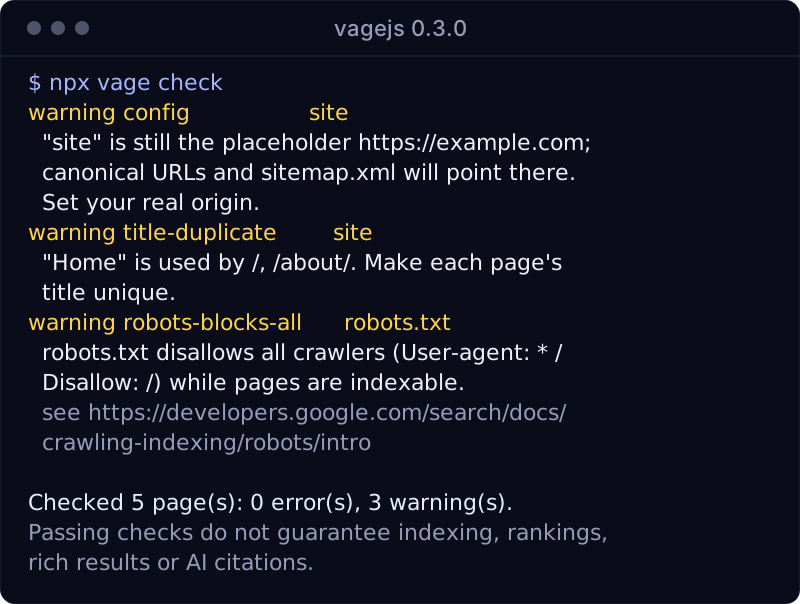
It also flags canonical tags that point at another site, pages with no <h1>, images without alt text, broken internal links and invalid structured data. The full list is in checks and audits.
Notice the last line. We print it on every run because it's true: a clean check means your site is technically readable, not that Google will rank it.
After launch: ask Google directly
Once the site is live on its real domain, add it to Google Search Console. It's free, it's Google's own view of your site, and it tells you whether a page is indexed and, if not, why. Submit your sitemap.xml there too. (Submitting it from the vagejs command line is on our roadmap; today you do it in Search Console.)
If you'd like Search Console numbers in your terminal, vagejs can read them for you. You create a Google OAuth client once (the CLI reference explains how), then:
npx vage connect gsc       # read-only access, approved in your browser
npx vage report search     # top queries and top pages, last 28 days
That report shows clicks, impressions and positions for your top queries and pages. It doesn't cover Google's page indexing report, so for "why isn't this page indexed?" use the URL Inspection tool in Search Console itself.
For a quick outside view without signing in anywhere, our free AI visibility checker fetches your home page as Googlebot, Bingbot and the main AI crawlers, and flags robots.txt blocks, challenge pages and noindex. It doesn't replace Search Console's indexing report, but it spots several of the causes above.
What vagejs can't do about indexing
We'd rather you know the limits up front.
- It can't make Google index you. It removes technical reasons for being skipped. Useful content, a little time, and other sites linking to you still do the rest.
- It won't convert your existing AI-built app. There's no automatic importer. Moving over means putting your text into Markdown files, which for a small business site is usually an afternoon, but it's still work.
- It's for content sites. If your project has logins, dashboards or data that changes per visitor, you need an application framework, not a static site generator.
- It only sees your files. A host that blocks Googlebot at the firewall or sends a
noindexheader won't show up invage check. After you deploy,vage verifylooks at the live site, including whether search crawlers get through (see deployment).
Why sites go missing from Google, in short
- If your words aren't in the page source, crawlers start with an empty page. Google renders JavaScript later; many other bots don't run it at all.
- Leftover
noindextags, aDisallow: /robots file, placeholder domains and duplicate titles are the most common self-inflicted reasons for being skipped. - vagejs writes finished HTML, builds the sitemap and robots file from your real pages, and
vage checkwarns about the rest before you publish. - Search Console is the final word on what Google has indexed. No tool, ours included, can promise rankings.
Check your own site before it launches
You'll need Node.js 22.12 or newer:
npm create vagejs@latest my-site
cd my-site
npm install
npm run check
Set site in vage.config.ts to your real domain, write your pages in src/pages/, and run npm run check until it's clean. If an AI assistant is doing the writing, it can follow the project's AGENTS.md; see using vagejs with AI agents.
If AI assistants can't find you either, that's a related but separate problem, covered in why ChatGPT and Perplexity can't see your website. Otherwise, start with the getting started guide, or read more about SEO in vagejs.