On this page
Maybe a developer friend told you to "just use a static site generator." Maybe an AI assistant suggested one when you asked how to build a simple website. Either way, the name doesn't explain much. Here's what these tools actually do, why so many blogs, docs sites and company sites use them, and the cases where they're the wrong choice.
Two ways to make a web page
Every web page you visit is, in the end, a file of HTML that a browser turns into what you see. The interesting question is when that HTML gets made.
On request. A typical content management system keeps your words in a database. When someone visits a page, the server runs code, reads the database, fills in a template and sends back fresh HTML. Caching can soften this, but the basic model is "build the page when someone asks for it."
Ahead of time. A static site generator does all of that work once, on your computer or on a build server, before anyone visits. It reads your content, wraps it in your templates and writes out every page as a finished HTML file. When a visitor arrives, the server just hands over a file that already exists. Nothing is assembled at that moment.
"Static" doesn't mean the site never changes or looks plain. It means each page is the same for every visitor until you rebuild it. You can have animations, videos and good design. You just don't have code running on a server every time someone loads a page.
What a static site generator does, step by step
Most generators follow the same four steps, whatever language they're written in.
- You write content. Usually in Markdown, a simple way to format text with symbols like
#for headings and**for bold. Each page is its own file. - You (or a theme) provide templates. A template is the HTML around your content: the header, the menu, the footer, the styles. You write it once and every page uses it.
- You run the build. The generator reads every content file, turns the Markdown into HTML, places it inside the right template and works out the page's address from its file name.
- You get a folder of files. HTML, CSS, images and whatever else the site needs. You upload that folder to a host, and you're live.
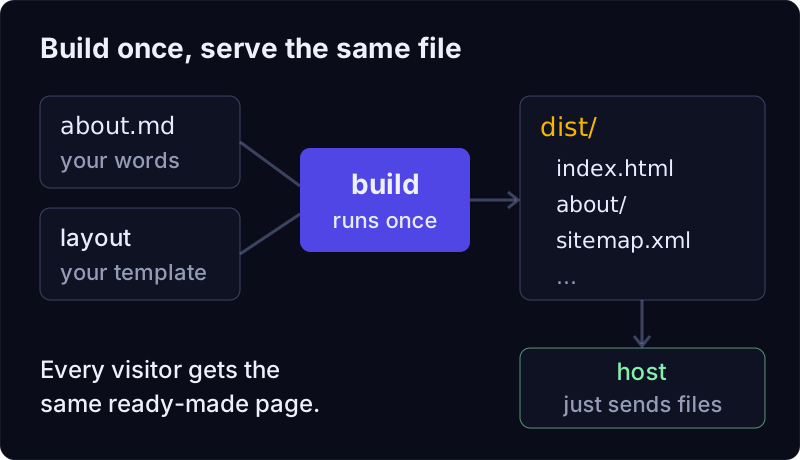
Many generators add helpers on top: a development server that shows your changes as you save, automatic sitemaps, lists of blog posts, image resizing. But the core idea is that loop of content plus templates, built into plain files.
Why do people choose a static site generator?
They're fast. Serving a ready-made file is about the least work a web server can do. There's no database query and no page assembly while the visitor waits. A static page can still be slow if it's stuffed with large images or scripts, but the starting point is good. (We wrote more about this in why a website with zero JavaScript loads faster.)
There's less to attack. With no database and no server code running per visit, whole families of problems disappear: there's no admin login page to guess passwords on, and no plugin running on the server waiting for a security patch. You still need to protect your hosting account and your code repository, but the live site itself is just files.
Hosting is simple and often free. Any host that can serve files can serve a static site, and several well-known hosts have free plans for them. We compared some options in free static website hosting.
Your content is plain files you own. Markdown files open in any text editor. You can keep them in Git (a tool that records every change), see who changed what, and roll back a mistake. If you switch tools later, your words come with you.
They work well with AI coding assistants. Because everything is text files with predictable names, an assistant can read the whole site, change a page and run the build, the same way a developer would.
When is a static site generator the wrong choice?
Static site generators are a great fit for a lot of sites, and a poor fit for some. Be honest with yourself about which one you're building.
- Logged-in or per-person pages. Dashboards, customer accounts, shopping carts and anything that shows different data to different people need a server or an application framework. A static site can link to such a service, but it can't be one.
- Content that changes every few seconds. Live scores or stock prices don't suit a site you rebuild to update. (Some static sites fetch live data with JavaScript in the browser, but then you're partly building an app.)
- Forms, search and comments need help. A contact form has to send its data somewhere. On a static site, that "somewhere" is usually a separate service or a small serverless function on your host. Not hard, but it's an extra piece to set up.
- Editors who don't want to touch files. If your team expects to log in to an admin screen and click "Publish," a file-based workflow can feel foreign at first. Some teams add a separate editing tool on top; others find that Markdown plus an AI assistant is enough.
- Very large sites can take a while to build. Every page is built ahead of time. For a few hundred pages that's usually quick; for tens of thousands, build speed becomes something you choose a tool for.
A quick tour of the field
There are many static site generators, and they differ mostly in their language, their template style and how much JavaScript they expect you to use.
- Older generators are often written in languages like Ruby, and one has long had built-in support on GitHub Pages.
- Single-program generators ship as one download, written in a language like Go, and are known for building large sites quickly.
- Islands-style generators build static HTML by default and let you add interactive pieces, often called islands, only where a page needs them.
- Application frameworks are built for apps, but some can also export a fully static site, which suits teams that already use React.
None of these is "the best" in general. They suit different people. If you're curious how they compare with ours, see vagejs compared.
How do you choose one?
A few questions narrow it down quickly:
- What will you build? A blog, docs, a portfolio or a small business site is the sweet spot. An app with accounts isn't.
- Which language are you comfortable reading? You'll edit templates sooner or later. Pick a tool whose templates make sense to you, or to whoever helps you.
- Who writes the content? If it's you or a developer, Markdown files are great. If it's a non-technical team, plan how they'll edit before you commit.
- What happens before you publish? Some tools leave checking to you. Others test links, titles and other details on every build. Mistakes on a live site are cheaper to catch before they go out.
- Where will you host it? Almost any host works, but some generators have ready-made deploy commands for particular hosts, which saves setup.
Where vagejs fits
vagejs is the static site generator we make, so take this section as our view, not a neutral one. It follows the same loop as the others: each Markdown file in src/pages/ becomes a page (about.md becomes /about/), layouts wrap the content, and npm run build writes the finished site into dist/.
Here's the real output of a build on a fresh starter site (vagejs 0.3.0, run on 24 October 2026; we only shortened the folder path):
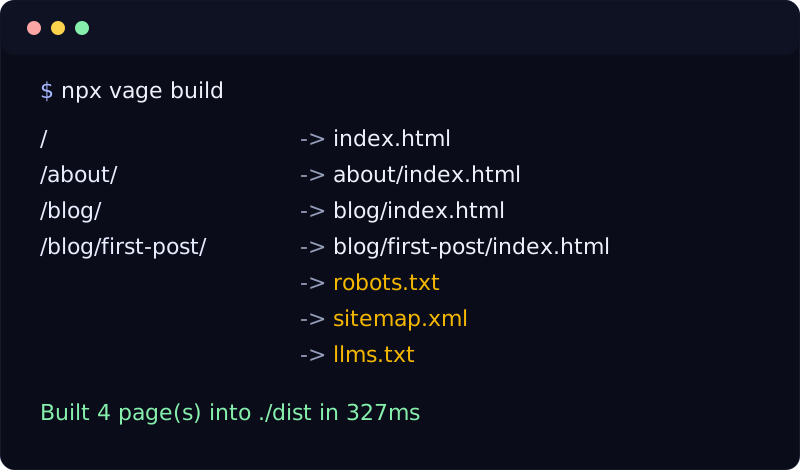
A few things set it apart from the tools above:
- Layouts are TypeScript functions, or React and Vue components. If you or your AI assistant can read a bit of JavaScript, you can read a vagejs layout. Pages can be Markdown or MDX.
- Pages ship with no JavaScript by default. Scripts only appear if you add them, for example an analytics tag you've turned on.
- Checks run before you publish.
npx vage checklooks for broken links, missing titles and descriptions, images with no alt attribute, invalid structured data and more, and exits with an error when something's wrong. See checks and audits. - Search files come for free. Every build writes
sitemap.xml,robots.txtandllms.txtfrom your pages. See SEO and AI search. - It's written for AI assistants too. Every new site includes an
AGENTS.mdfile explaining the project, andnpx vage info --jsondescribes every command and setting.
It's also young: it's at version 0.x, so expect changes between minor versions. Sites in more than one language are supported since 0.10 (see multi-language sites). If you need a mature ecosystem with hundreds of themes today, one of the older tools may suit you better.
Static site generators in a nutshell
- A static site generator builds every page ahead of time from content files and templates, and gives you a folder of plain HTML to host.
- That makes sites fast, cheap to host and harder to attack, and keeps your content in files you own.
- It's the wrong tool for logins, per-person data and live data, and forms or search need an extra service.
- Choose by what you're building, which templates you can read, who writes the content and how mistakes get caught.
If you'd like to try one, getting started with vagejs takes a couple of minutes, and the FAQ covers the usual first questions.