On this page
A customer tells you they asked an AI assistant for "a good bakery near the station" and it listed three places. Yours wasn't one of them, even though you're right next to the station. Curious, you ask ChatGPT about your own business by name. It apologizes and says it couldn't access your website.
That second answer is the useful one. It means something between the AI tool and your pages is in the way, and that's a technical problem you can usually find and fix. Let's look at how AI tools actually reach websites, the common things that stop them, and how to test it.
A quick reality check
Nobody can promise you'll be mentioned or linked by an AI assistant. Each company decides what its tools show, and those decisions change. What you can control is whether their crawlers are able to read your site at all. If they can't, nothing else matters, so that's where to start.
Three kinds of AI visitors
When people say "AI crawlers", they usually mean several different robots with different jobs. The companies document them, and the difference matters:
- Search crawlers build an index so the AI tool can find and link to pages when someone asks a question. OpenAI's is OAI-SearchBot, Anthropic's is Claude-SearchBot, and Perplexity's is PerplexityBot. OpenAI's documentation says sites that opt out of OAI-SearchBot won't be shown in ChatGPT search answers, though they can still appear as navigational links.
- Training crawlers collect pages that may be used to train future AI models. OpenAI's is GPTBot and Anthropic's is ClaudeBot. Google offers a robots.txt token called Google-Extended to control whether its crawled content may be used for training Gemini models; Google says it doesn't affect your inclusion or ranking in Google Search.
- User-triggered fetchers visit a page because a person asked about it right now: ChatGPT-User, Claude-User and Perplexity-User. OpenAI and Perplexity both say their user-triggered fetchers may not follow robots.txt, since a person requested the visit.
To write the rules for these crawlers without memorising their names, use our free AI crawler robots.txt generator.
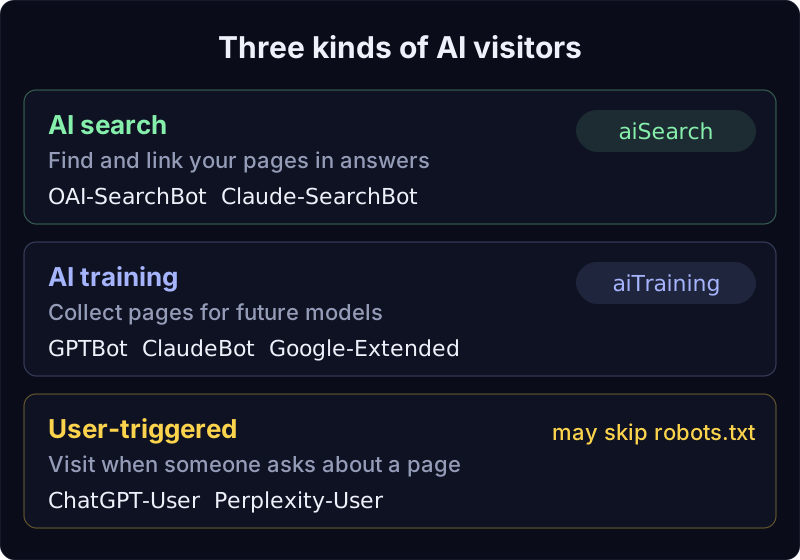
The practical upshot: blocking training crawlers and blocking search crawlers are separate choices. Plenty of site owners want the first and not the second. Trouble starts when one switch blocks both.
What usually blocks AI crawlers?
A firewall or bot setting at your host
Many hosts and CDNs (the networks that sit in front of websites to make them faster and safer) offer bot protection, sometimes with a one-click option to block AI bots. Those settings do what they say, which may include the search crawlers you actually wanted. Some protection also answers suspicious visitors with a challenge page ("Checking your browser...") instead of your content. A person clicks through. A crawler just sees the challenge page.
A robots.txt that says no to everyone
robots.txt is a small text file at the root of your site that tells crawlers which parts they may visit. A line like User-agent: GPTBot followed by Disallow: / asks GPTBot to stay away entirely. Copying a long "block all AI" list from a forum often blocks the search crawlers too.
Pages that need JavaScript to show their words
Many AI crawlers fetch your HTML and read it as it arrives, without running JavaScript the way a browser does. If your site builds its text in the browser, those crawlers get an almost empty page. A quick test: use "View page source" in your browser and check whether your real text is there.
A "noindex" header you can't see
Some hosts can send an X-Robots-Tag: noindex header with every page. It's invisible in the page itself, but it tells search engines not to keep it.
How vagejs handles the parts it controls
Your words are in the HTML
vagejs builds every page ahead of time into plain HTML, with no client JavaScript unless you add some yourself. Any crawler that can download a page can read it, whether or not it runs scripts.
One clear setting for each choice
The AI crawler policy lives in vage.config.ts, and it's off until you decide. Here's a site that opts out of training but welcomes AI search:
seo: {
  robots: {
    aiTraining: "disallow", // GPTBot, ClaudeBot, Google-Extended, Applebot-Extended
    aiSearch: "allow",      // OAI-SearchBot, Claude-SearchBot, PerplexityBot
  },
},
And this is the robots.txt the build wrote from it with vagejs 0.3.0. Since 0.3.1, the same settings also write groups for Applebot-Extended and PerplexityBot:
User-agent: GPTBot
Disallow: /

User-agent: ClaudeBot
Disallow: /

User-agent: Google-Extended
Disallow: /

User-agent: OAI-SearchBot
Allow: /

User-agent: Claude-SearchBot
Allow: /

User-agent: *
Disallow:

Sitemap: https://example.com/sitemap.xml
The crawler names come from a rule pack inside vagejs, built from each company's own documentation. Run npx vage guidelines to see the list and its sources. Two honest notes. First, the two settings cover only the crawlers listed above; for any other crawler, add your own group under seo.robots.rules. Second, robots.txt is a polite request, not a lock. Well-behaved crawlers follow it.
Optional extras for AI tools
vagejs also writes llms.txt, a short Markdown index of your pages that some AI tools look for. With seo: { markdownCopies: true } it publishes a plain Markdown copy of each page too. Both are emerging conventions, not guarantees that any tool uses them. If your site isn't built with vagejs, our free llms.txt generator formats the file for you to copy and upload. More detail is in SEO and AI search.
Test it: vage verify asks as each crawler
Your files can be perfect and your host can still turn crawlers away. So after you deploy, npx vage verify checks the live site. As well as comparing every page with your files, it fetches your home page as 10 search and AI crawlers: Googlebot, Bingbot, OAI-SearchBot, GPTBot, ChatGPT-User, Claude-SearchBot, ClaudeBot, Claude-User, PerplexityBot and Perplexity-User.
It reports:
- a block or challenge page that a normal browser doesn't get,
- a
robots.txtrule that shuts it out of the whole site (training crawlers get a gentle "fine if that's your choice"), - an
X-Robots-Tag: noindexheader, and http://orwww.addresses that serve the site instead of redirecting to your one real address.
We ran it on our own machine against vage preview (which serves the built site locally), using the config above. Real output, vagejs 0.3.0, 24 October 2026:
warning robots-blocked  /robots.txt
        robots.txt disallows GPTBot (OpenAI, ai-training) from the whole site. Fine if that's your choice (seo.robots.aiTraining).
warning robots-blocked  /robots.txt
        robots.txt disallows ClaudeBot (Anthropic, ai-training) from the whole site. Fine if that's your choice (seo.robots.aiTraining).

Verified 4 page(s) on http://localhost:4391 and probed 10 search and AI crawlers: 0 error(s), 2 warning(s).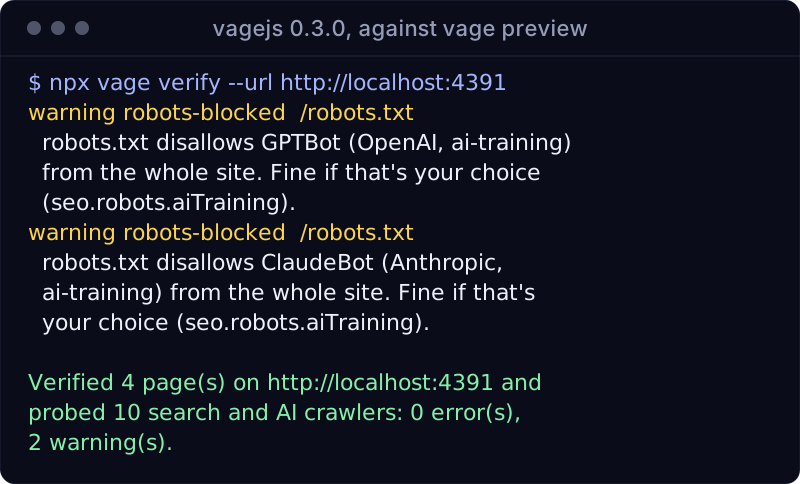
Those two warnings are exactly what we asked for. When we switched aiSearch to "disallow", the same run added warnings for OAI-SearchBot and Claude-SearchBot without the "fine if that's your choice" note, which is the kind of thing you want to spot before a customer does. A robots.txt rule that shuts out Googlebot or Bingbot is reported as an error, not a warning.
New vagejs sites also include a GitHub Actions workflow that runs vage verify every day once you set the VAGE_VERIFY_URL variable, so a host setting that changes quietly doesn't stay hidden for months. See deployment for setup.
Not on vagejs, or just want a quick look from your browser? Our free AI visibility checker requests any site's home page as Googlebot, Bingbot and the OpenAI, Anthropic and Perplexity crawlers, and reports robots.txt rules, challenge pages and noindex.
Where crawler checks stop
- It can't make an AI tool cite you. Being readable is the entry ticket. What each assistant shows depends on its own systems and on how useful and well-known your content is.
- It can't see blocks by IP address.
vage verifysends each crawler's documented user agent from your computer or CI, not from the crawler company's real servers. If your host blocks or allows bots by their network addresses, the probe can't tell. Your host's bot settings are the place to confirm. - It doesn't change your host's settings. If the probe finds a challenge page, you fix it in your host's or CDN's dashboard.
- User-triggered fetchers aren't tested against robots.txt, because some of them may not follow it anyway.
- It doesn't track mentions. vagejs doesn't watch what AI assistants say about you.
Try it: probe your site as 10 crawlers
You need Node.js 22.12 or newer:
npm create vagejs@latest my-site
cd my-site
npm install
npm run build
npx vage preview      # in one terminal
npx vage verify --url http://localhost:4173   # in another
The preview prints its own address; use that in the second command. Once your site is live, run npx vage verify without --url and it checks the site address from your config.
If you're still deciding whether to welcome AI crawlers at all, start with the choices in SEO and AI search, and if your site isn't in regular Google results either, read why your AI-built website isn't showing up on Google.
AI crawler access, summed up
- AI tools use separate crawlers for search, for training and for live user requests. Blocking one doesn't have to block the others.
- Host bot settings, broad robots.txt lists, JavaScript-only pages and hidden
noindexheaders are the usual reasons an AI tool can't read a site. - vagejs writes plain HTML and a robots file from two clear settings,
aiTrainingandaiSearch. vage verifyfetches your live site as 10 search and AI crawlers and tells you which ones are turned away and why.- Being readable doesn't guarantee being cited. It's the step everything else depends on.