On this page
You open your server logs, or your host's analytics, and see names you don't recognize: GPTBot, ClaudeBot, PerplexityBot. A friend tells you to block them all, because AI companies are "stealing" your writing. Another friend says blocking them will make you invisible in ChatGPT. Both are partly right, and both are missing the detail that actually decides it: AI bots don't all do the same job.
This guide explains the different kinds, what blocking each one really changes according to the companies' own documentation, and how to make a choice that fits your site.
What kinds of AI crawlers are there?
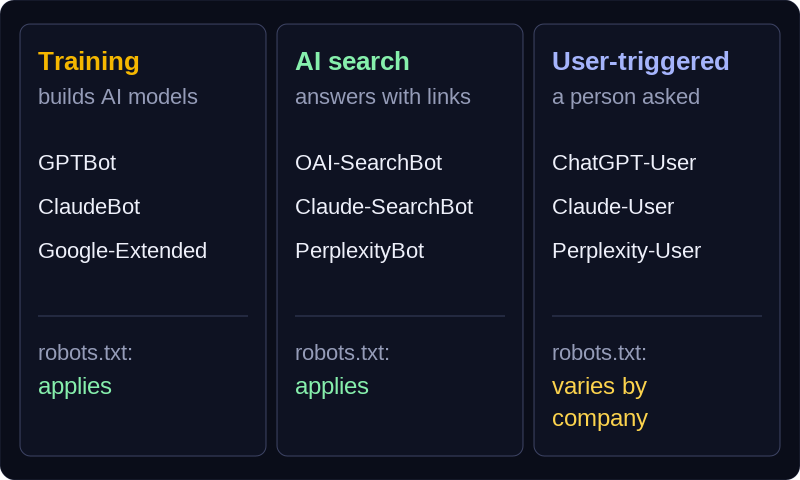
The big AI companies now run separate bots for separate purposes, and they document them separately. Broadly, there are three kinds.
Training crawlers gather pages that can end up in the data used to build AI models. The best-known named ones are GPTBot (OpenAI) and ClaudeBot (Anthropic). Google has a control called Google-Extended, which works a little differently (more on that below).
AI search crawlers visit pages so an AI product can show them as sources in its answers, usually with a link. OpenAI's OAI-SearchBot surfaces sites in ChatGPT's search features, Anthropic's Claude-SearchBot indexes content for Claude's search results, and PerplexityBot surfaces and links sites in Perplexity's answers. Perplexity says PerplexityBot isn't used to train foundation models.
User-triggered fetchers load a page only when someone asks an assistant to, in that moment, like "summarize this article." These are ChatGPT-User, Claude-User and Perplexity-User. They're not crawling the web on their own schedule.
How you block them: robots.txt
The standard way to tell a crawler to stay away is a file called robots.txt at the root of your site. It's made of groups: a User-agent: line naming a bot, followed by Allow: or Disallow: lines saying which paths it may visit. A group for * applies to every bot that doesn't have its own group.
User-agent: GPTBot
Disallow: /
That asks GPTBot not to crawl anything on your site. The key word is asks. Google's own documentation puts it plainly: robots.txt can't enforce crawler behavior, it's up to the crawler to obey, and it isn't a way to keep a page out of search results (for that you use noindex or a password). Reputable crawlers follow it. A badly behaved one can ignore it.
What does blocking each kind change?
Here's what the official documentation from each company says, in our own words.
Blocking training crawlers. OpenAI says blocking GPTBot signals that your content shouldn't be used to train its foundation models. Anthropic says blocking ClaudeBot should keep your future material out of its training datasets. Note the word future: robots.txt works going forward, not backward.
Google-Extended is special. It isn't a separate bot with its own visits. Google crawls with its usual crawlers, and Google-Extended is only a name you can use in robots.txt to say whether that content may be used for training future Gemini models and for grounding (feeding search content to a model at answer time). Google states that it does not affect whether your site appears in Google Search and isn't used as a ranking signal there. So blocking Google-Extended won't remove you from Google; blocking Googlebot would, which is almost never what you want.
Blocking AI search crawlers. This is the one with a visible cost. OpenAI says that if you block OAI-SearchBot, your site won't appear in ChatGPT's search answers, though it may still show up as a plain navigation link. Anthropic says blocking Claude-SearchBot stops your content being indexed for its search, which may reduce your visibility there. OpenAI also notes that changes to robots.txt can take around 24 hours to affect search.
The settings are independent. OpenAI's documentation says each bot is controlled separately, so blocking GPTBot doesn't block OAI-SearchBot. That's what makes the popular middle ground possible: no training, yes to AI search. (OpenAI adds that if you allow both, it may use one crawl for both purposes.)
User-triggered fetchers are a grey area. OpenAI says that because ChatGPT-User acts on a user's request, robots.txt rules may not apply to it. Perplexity says Perplexity-User generally ignores robots.txt for the same reason. Anthropic says blocking Claude-User stops Claude retrieving your pages for user queries. If you need a page to be truly private, robots.txt is the wrong tool anyway: put it behind a login.
One more tip from Anthropic: don't block its bots by IP address alone, because then they can't read your robots.txt, and the opt-out may not work reliably.
How do you decide?
There's no correct answer for everyone. It's a trade between control over how your words are used and visibility in the places people now ask questions. A few questions help:
- Is your writing the product? If you sell articles, courses, research or creative work, blocking training crawlers protects something you'd otherwise give away.
- Do you want customers to find you through AI answers? A local business, a software tool or a consultant usually does. Blocking AI search crawlers works against that.
- Are you comfortable with training if it comes with visibility? Some site owners allow everything, reasoning that being well represented in AI tools is worth more to them than the control.
- Do you know what your host is doing? Some hosting and CDN services offer bot-blocking settings, and some turn on protections that can block or challenge crawlers before they ever read your robots.txt. Check those settings, because they can contradict the choice you made in robots.txt.
For many small businesses and personal sites, the middle ground is a sensible default: block training, allow AI search. But "allow everything" and "block everything" are both reasonable positions if you've thought them through.
Whatever you choose, remember the limits. None of these settings guarantees that an AI product will cite you, and robots.txt can't remove content that was collected before you changed it.
Setting it in vagejs
We make vagejs, a static site generator, and this choice is built into its configuration. By default, its robots.txt lets every crawler in and points to your sitemap; nothing changes until you decide. Two settings in vage.config.ts cover the documented training and search crawlers:
// vage.config.ts
seo: {
  robots: { aiTraining: "disallow", aiSearch: "allow" },
},
aiTraining writes groups for GPTBot, ClaudeBot, Google-Extended and Applebot-Extended; aiSearch writes groups for OAI-SearchBot, Claude-SearchBot and PerplexityBot. Here's the real file vagejs 0.3.0 wrote for a starter site with those two settings (built 24 October 2026; the address is a placeholder). Applebot-Extended and PerplexityBot were added in 0.3.1, so current versions write those two groups as well:
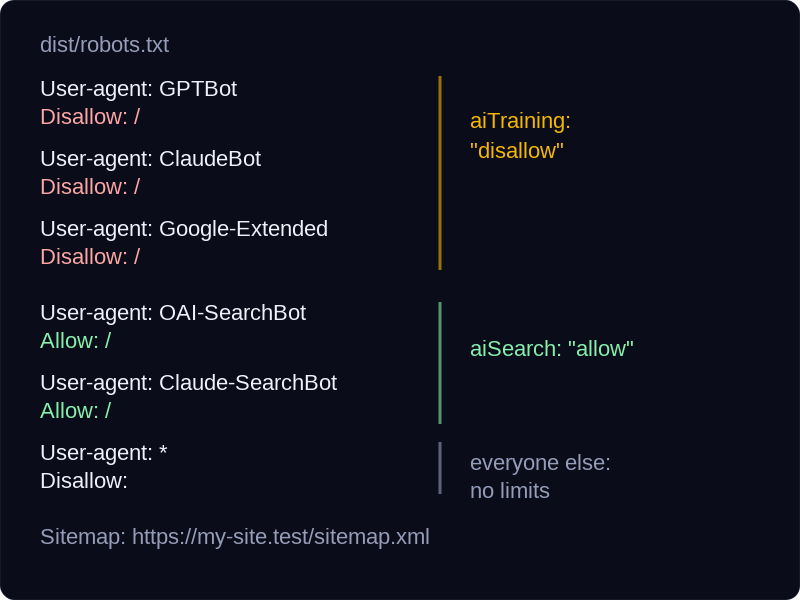
The crawler names aren't hard-coded guesses. They live in a reviewed list that cites each company's documentation, and npx vage guidelines prints those sources. Bots outside the two groups can be added by hand with seo.robots.rules. If you name the same bot both ways, the build stops and asks you to keep one, so the file never contradicts itself. And npx vage check warns if robots.txt blocks every crawler while your pages are meant to be indexed.
Because hosts and CDNs can block bots too, npx vage verify checks the live site from the outside. It requests your home page as 10 search and AI crawlers, reports any that get blocked or challenged, and reads your live robots.txt. Here's real output from vagejs 0.3.0, run on 24 October 2026 against the same starter served locally with vage preview:
warning robots-blocked  /robots.txt
        robots.txt disallows GPTBot (OpenAI, ai-training) from the whole site. Fine if that's your choice (seo.robots.aiTraining).
warning robots-blocked  /robots.txt
        robots.txt disallows ClaudeBot (Anthropic, ai-training) from the whole site. Fine if that's your choice (seo.robots.aiTraining).

Verified 4 page(s) on http://localhost:4517 and probed 10 search and AI crawlers: 0 error(s), 2 warning(s).
Those two warnings are the choice we made, reported back so it's never a surprise. There's an honest limit here: the probes can copy a crawler's name but not its network address, so a block based on the real crawlers' IP addresses won't show up. The SEO and AI search docs and configuration guide have the details.
Deciding on AI crawlers: the key points
- AI bots do three different jobs: training, AI search and fetching a page for a user. Treat them separately.
- robots.txt is a request that reputable crawlers follow, not a lock, and it works going forward.
- Blocking training crawlers doesn't hide you from AI search, and blocking Google-Extended doesn't affect Google Search.
- Blocking AI search crawlers keeps you out of those products' answers, so only do it on purpose.
- Check your host's bot settings too; they can override what your robots.txt says.
If you're also wondering about the other AI file people mention, see what is llms.txt, and do you need one?. Unlike robots.txt, it doesn't control access at all.