On this page
It's Friday afternoon. Your AI assistant has tidied up the pricing page, fixed a typo in the footer and renamed a couple of files. Everything looked fine on your laptop. You deploy, close the lid, and go home.
On Monday a customer emails to say the "Book a call" button goes nowhere. It's been broken all weekend.
After a few mornings like that, deploying starts to feel like defusing a bomb. You put it off, changes pile up, and the next deploy is bigger and scarier. The fix isn't more courage. It's a deploy process with checks built in, so that most mistakes get caught before they reach visitors, and the rest get noticed quickly.
Why do deploys break websites?
Most broken deploys come from a short list of causes:
- Nobody checked first. A renamed page leaves links pointing at nothing. A required field goes missing. It all builds fine, so nothing complains.
- The wrong things got uploaded. A stray
.envfile with passwords in it, the wholenode_modulesfolder, or last week's build output. - Someone else's work got overwritten. A "force push" replaces what's on the server with your copy, deleting whatever a colleague (or another AI session) pushed in the meantime.
- The site went down during the switch. Some deploy methods briefly detach your domain or serve a half-uploaded site.
- "Done" meant the command finished, not that the site works. The tool said success; the site said 404.
We've been caught by that last one ourselves. Once, a plain wrangler deploy (Cloudflare's own deploy command) re-applied the domain settings for vagejs.com, and the site answered 404 for about three minutes. That's the kind of thing that makes people nervous, and it's why vagejs deploys work the way they do.
Think of a deploy as gates, not a button
In vagejs, deploy commands follow the same order, and each step has to pass before the next one starts. (The Git step applies when you publish through Git; the no-downtime switch is how Cloudflare Workers deploys work.)
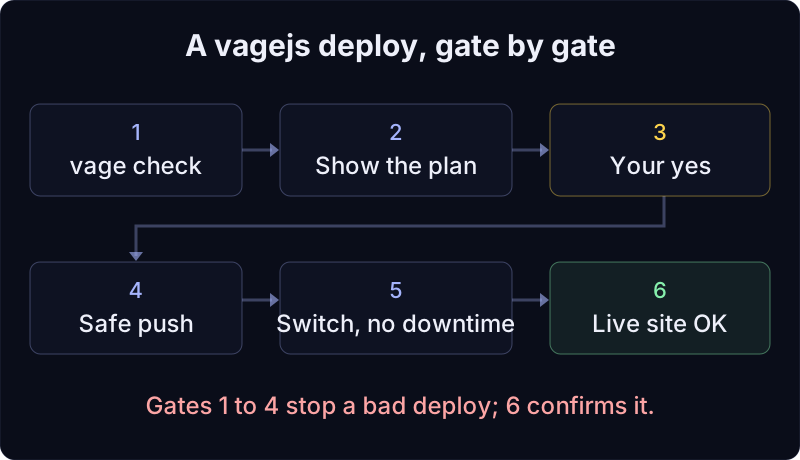
Gate 1: check before anything else
Every vagejs deploy runs vage check first. That looks for broken internal links, missing page titles, redirects that point nowhere, invalid structured data, links to websites you haven't approved, and more. If it finds an error, the deploy stops. Here's what happened when we added a link to a page that doesn't exist and tried to deploy (vagejs 0.3.0, 24 October 2026):
$ npx vage deploy --dry-run
Error: vage check found 1 error(s). Fix them before deploying.
Nothing was built or uploaded. Running npx vage check on its own shows exactly which link is wrong. The full list of checks is in checks and audits.
Gate 2: see the plan
Next, vagejs builds the site and shows you what it's about to do, in plain words. Add --dry-run and it stops there. This is the real plan for a small site deploying to a Cloudflare Worker (local path shortened):
Deploy plan (Cloudflare Workers)
  • upload ./dist (5 page(s), 5 generated file(s)) to Worker "sunrise-bakery"
  • uses wrangler.jsonc (routes and custom domains stay as they are)
  • runs: npx wrangler@4.152.0 versions upload, then versions deploy <version>@100% (a brand-new Worker gets wrangler deploy once)
  • verifies: https://sunrise-bakery.example answers 200
Dry run: nothing deployed.
Gate 3: nothing happens without your yes
Without --dry-run, the plan ends with Proceed? [y/N]. The default is no. If the command isn't running in a terminal where someone can answer (an AI agent's session or a script, for example), vagejs refuses unless you pass --yes. The AGENTS.md file in every new site tells AI assistants to show you the plan and ask before publishing or deploying. So "the assistant deployed while I was at lunch" isn't how things go by default.
Gate 4: safe Git, every time
If your site is in a Git repository, npx vage deploy:github commits and pushes it safely. Here's the plan for a one-line change (real output; the remote is a local test repository):
Publish plan for .
  • commit 1 file(s) on main: "Add Saturday sourdough"
       M src/pages/menu.md
  • push to ../writer-a-remote.git (main); never forced
Dry run: nothing changed.
Behind that plan, vagejs:
- refuses to commit secrets:
.envfiles, private keys, and text that looks like API tokens from GitHub, Stripe, Google, OpenAI, Anthropic and others; - refuses build output and dependencies (
dist/andnode_modules/); - re-checks what's staged after you say yes, and stops if files changed since you saw the plan;
- never force-pushes. If someone else pushed first, the push is rejected and vagejs tells you to run
git pull --rebase, resolve any conflicts, and publish again. Your commit stays safe on your machine. - confirms the push landed by asking the remote which commit it now has.
Gate 5: switch without downtime
How the new version goes live depends on your host:
- Cloudflare Workers (
deploy.target: "cloudflare-workers"): vagejs uploads a new version of your Worker, then switches 100% of traffic to it. Your custom domains are left exactly as they are, so the site stays up throughout. vagejs also refuses to deploy if yourwrangler.jsoncnames a different Worker than the one you asked for, or if it doesn't serve thedist/folder. - GitHub Pages (
npx vage deploy): vagejs pushes your code, and a GitHub Actions workflow runsvage checkand the build again on GitHub's machines before publishing. - Cloudflare Pages: vagejs uploads
dist/. Branches other than production get their own preview address, so you can look before you merge.
Setup for each one is in deployment.
Gate 6: done means the live site answers
vagejs only reports success when the host's tool succeeded and the result can be confirmed. On Cloudflare, your site has to respond with a normal page (HTTP 200); vagejs checks up to five times, three seconds apart, and then prints "Deployed and verified". On GitHub Pages it uses the GitHub CLI to wait for the Actions run and reports GitHub's own verdict. If it can't confirm, it says "not confirmed" and tells you why, rather than guessing.
After the deploy: compare the live site with your files
A deploy can succeed and still not match what you meant to publish: an old cached version, a host feature that injects a script, or, in the worst case, someone changing files on the server. npx vage verify fetches every page of the live site and compares it with a fresh build of your files: links, scripts, text, robots.txt and the sitemap. New vagejs sites include a GitHub Actions workflow that runs it daily once you set the VAGE_VERIFY_URL variable, and GitHub emails you if a run fails.
Practise before production
The safest deploy is one you've already watched work:
npm run previewserves the built site on your computer, the way a static host would.- New sites include a CI workflow that runs check, build and audit on every push and pull request, and saves the built site as a downloadable file for seven days, so someone can review it before it goes live.
- On Cloudflare Pages, each non-production branch gets a preview address.
What if something still goes wrong?
No checker catches everything, so have an undo plan. vagejs doesn't have a rollback command. Because your whole site is in Git, the dependable way back is to revert the bad commit and deploy again:
git revert HEAD
npx vage deploy
That goes through all the same gates. If you're on Cloudflare Workers, Cloudflare also keeps earlier versions of your Worker and lets you roll back from its dashboard or with wrangler rollback. That's Cloudflare's feature rather than ours, but it's handy when every minute counts.
What the deploy gates can't catch
- It can't judge your content.
vage checkfinds broken links and missing tags, not a wrong price or an ugly layout. Look at the preview. - It doesn't test outside services. If your booking widget or form provider is down, the check still passes.
- It only deploys to some hosts. The built-in targets are GitHub Pages, Cloudflare Workers, Cloudflare Pages and Netlify. Vercel has no vagejs deploy command: it serves the
dist/folder your build makes. On Vercel and other hosts, you build with vagejs and publish with that host's own tools, without these gates. - Your accounts are still yours to protect. Two-factor authentication on your Git host, your hosting account and your domain registrar matters more than any deploy tool.
Try a dry-run deploy
You need Node.js 22.12 or newer. In an existing vagejs site:
npx vage check
npx vage deploy --dry-run
Read the plan. If it says what you expected, run it again without --dry-run and answer y. If you work with an AI assistant, our guides for AI agents show how to set it up so it follows the same rules.
Safe deploys, point by point
- Deploys break sites when nobody checks first, the wrong files go up, someone's work gets overwritten, the domain detaches, or "success" isn't verified.
- vagejs runs
vage checkbefore every deploy and stops on errors. - You see the plan and answer yes before anything changes; scripts and agents need an explicit
--yes. - Git publishing refuses secrets and build output, and never force-pushes.
- On Cloudflare Workers, a new version takes over without detaching your domains, and success means the live site answered.
vage verifychecks afterwards that the live site matches your files.