On this page
It started well. You picked a template, dragged in your photos, typed your story and had a good-looking website by the weekend. A few years on, things look different. The monthly price has gone up. You want a feature the plan doesn't include. Maybe you'd simply like a developer friend, or an AI assistant, to help with the site. So you look for an "export" button, and find that what you can take with you is a lot less than what you built.
This is lock-in, and it's one of the most common reasons people feel stuck with a website. Here's why it happens, what owning your site actually means, and how vagejs is designed so that leaving is always possible, even leaving vagejs.
Builders are good at what they do
First, some fairness. Hosted website builders solve real problems. You don't have to think about servers, security updates or uptime. The editor shows you the page as you change it. Forms, shops, bookings and newsletters are often a click away. For lots of people that's exactly the right deal, and if you're happy, there's no reason to move.
The trade is that the builder bundles everything together: your words, your design, the code that displays them and the hosting that serves them. Each piece works because it's on that platform. That's what makes it easy to start, and it's also what makes it hard to leave.
Why can't you just take it with you?
Lock-in rarely comes from a single decision. It comes from how a builder stores your site:
- Your content lives in their database. Pages, posts and images are stored in the platform's own format. You see them through the editor, not as files.
- Your design only runs on their platform. Templates and drag-and-drop sections are rendered by the builder's own code. Even if you could download them, nothing else could display them.
- Exports vary a lot. Some builders can export blog posts or a product list. What you can take, and in what form, depends on the platform, so check your builder's help pages before you plan a move.
- Your web addresses are part of the deal. If page URLs follow the platform's patterns, moving means they'll change, and old links and search results will break unless you set up redirects.
- Extras don't travel. Forms, members' areas, shops and booking calendars are usually built into the platform and have to be replaced, not moved.
None of this is sinister. A visual editor that works for everyone has to keep the parts tightly connected. But it means "my website" is really "my account on someone's website service".
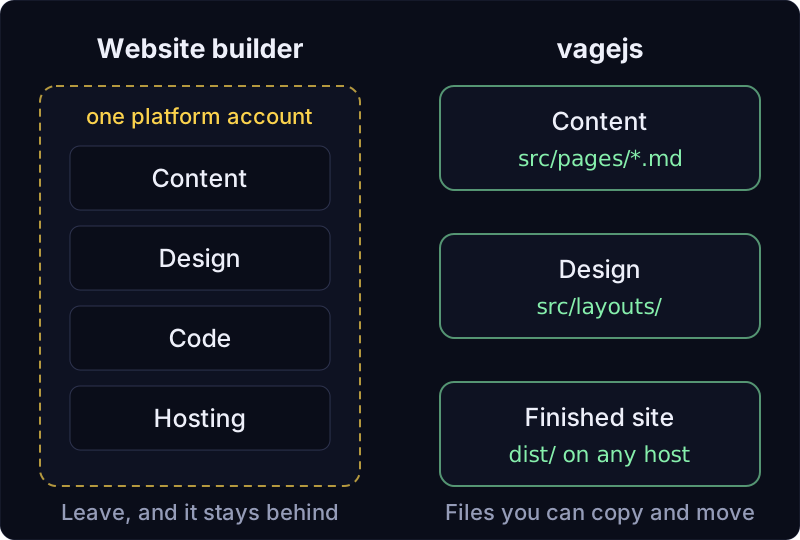
What does owning your site mean?
Owning a website isn't about where it's hosted. It comes down to four questions:
- Can you copy the whole site to a USB stick? Not a summary, the real thing.
- Can other tools read it? If you stopped using today's tool, could something else open your content?
- Can any host serve it? Or only one company's servers?
- Is your domain in your name? Your address is the part visitors remember, and it should move with you.
If the answers are yes, you own your site, whichever tools you use today.
How vagejs keeps you free to leave
vagejs is a free, open-source (MIT-licensed) static site generator. It takes a folder of text files and builds a finished website ahead of time. There's no account to create and no platform to sign in to. Here's how it answers those four questions.
Your content is plain Markdown files
Every page is a file in src/pages/. The file's path becomes its web address: src/pages/services.md is published at /services/. Inside, it's Markdown, a widely used plain-text format, with a few labelled settings at the top:
---
title: Services
description: What we offer and what it costs.
---

# Services

We repair and service bikes of every kind.
Markdown isn't a vagejs format. Many other site generators, documentation tools, note-taking apps and code platforms read it. If you stopped using vagejs tomorrow, your content would still be readable, editable and portable. Images go in public/ as ordinary image files.
The finished site is a folder of plain files
npm run build turns those files into a ready-to-serve website in a folder called dist/. We built a fresh starter site with vagejs 0.3.0 on 24 October 2026, and this is the whole of dist/:
dist/404.html
dist/about/index.html
dist/apple-touch-icon.png
dist/blog/first-post/index.html
dist/blog/index.html
dist/favicon.ico
dist/favicon.svg
dist/index.html
dist/llms.txt
dist/robots.txt
dist/sitemap.xml
That's plain HTML pages, icons, and three text files for search engines and AI tools (robots.txt, sitemap.xml and llms.txt). There's no server program and no database. Anything that can serve files over the web can serve this folder. And since the pages ship no JavaScript by default, there's no hidden runtime tying them to anything either.
Publishing works with several hosts
vagejs has built-in deploy commands for GitHub Pages, Cloudflare (Workers or Pages) and Netlify, each of which checks and builds the site first and asks before publishing. For other hosts, such as Vercel, point the host at the dist/ folder your build makes, or upload its contents with whatever tool that host provides. The deployment docs cover the details.
Redirects that work anywhere
When you rename a page, you add one line to vage.config.ts:
redirects: { "/old-page/": "/new-page/" },vagejs writes a small redirect page at the old address, which works on any host because it's just an HTML file. On the Cloudflare targets, it also writes a _redirects file so the redirects become proper permanent (301) redirects. Then npm run check flags any redirect that points at a page that doesn't exist. That's useful when you move in from a builder, too: list your old URLs, add a redirect for each one that changes, and old links keep working. More in routing.
No vagejs in the output
The finished pages don't depend on vagejs to work. If you later move to another tool, your Markdown files come with you and your current live site keeps running from its static files while you switch.
Moving off a builder, step by step
If you've decided to move, here's a practical order:
- Make a list of every page on the current site and its address. Your sitemap (often at
/sitemap.xml) is a good start. - Export what your builder lets you export, then copy the rest by hand. For a small site this is usually an afternoon of copying and pasting text into Markdown files.
- Download your images and put them in
public/images/. - Keep the same addresses where you can. For any that change, add redirects.
- Run
npm run checkuntil it reports 0 errors. It catches broken internal links, missing titles and descriptions and redirects that point nowhere. - Publish, then move your domain to the new host once you're happy.
An AI coding assistant can do a lot of the copying and formatting. Every vagejs site includes an AGENTS.md file that tells assistants how the project works; our prompt library has requests you can adapt.
Build a test site and look inside dist
You need Node.js 22.12 or newer:
npm create vagejs@latest my-site
cd my-site
npm install
npm run dev
Edit src/pages/index.md, then run npm run build and look inside dist/. Everything there is yours. The getting started guide takes it from there.
Builder lock-in in a few lines
- Builders bundle content, design, code and hosting, which makes starting easy and leaving hard. That's a trade-off, not a trick.
- Owning your site means you can copy all of it, other tools can read it, any host can serve it and the domain is yours.
- vagejs keeps content as Markdown files, builds plain HTML into
dist/, deploys to several hosts and writes redirects that work anywhere. - The costs: no online visual editor, no built-in shop, a contact form only on Cloudflare, and publishing is your job. Choose the trade you're comfortable with.
What owning your files costs
Owning your files comes with trade-offs, and you should weigh them honestly:
- No online visual editor. You edit text files, by hand, with an AI assistant, or in the local editor on your own computer, which has forms and a live preview. Editing on the live site isn't available.
- Built-in extras don't exist. There's no shop, members' area or booking system. Contact forms aren't allowed inside page content. On Cloudflare Workers, vagejs has a built-in contact form that a developer adds to a layout. On other hosts, a developer adds a form in a layout using an outside form service, and approves that service's domain in
links.lock.json. - You're responsible for publishing. vagejs makes deploys careful (checks first, asks before going live), but there's no support desk to call when your domain settings are wrong.
- Moving takes effort. No tool can import every builder's site automatically. Budget time for copying content and checking redirects.
If those are deal-breakers, staying on a builder is a perfectly reasonable choice. Our comparison pages look at where other tools are the better fit.