Our shop is open every day. See opening hours.
``` ``` Our shop is open **every day**. See [opening hours](/hours/). ``` The second one is readable even if you've never seen Markdown. That's the whole idea. A few reasons it's everywhere now: - **It's just text.** A Markdown file opens in any editor on any computer, now and in twenty years. No special app, no lock-in. - **It keeps writing separate from design.** You write headings, paragraphs and lists. The website's templates decide fonts, colors and spacing. Nobody can accidentally make one paragraph bright purple. - **It works with version control.** Because it's plain text, tools like Git can show exactly which words changed between two versions of a page. - **AI assistants speak it fluently.** Many chat assistants format their replies in Markdown, and coding assistants read and write Markdown files all day. ## The syntax you'll use every day You don't need to memorize everything. These cover nearly all real-world writing. **Headings** start with `#`. One `#` is the main title of the page, two is a section, three is a subsection: ``` # Our services ## Website design ### What's included ``` **Paragraphs** are just lines of text separated by a blank line. A single line break inside a paragraph usually doesn't start a new paragraph; you need the empty line. **Bold and italic** use asterisks: `**bold**` and `*italic*`. Underscores work too (`__bold__`, `_italic_`), but pick one style and stick to it. **Links** put the text in square brackets and the address in round brackets: `[our prices](/pricing/)`. For another website, use the full address: `[Node.js](https://nodejs.org/)`. **Images** look like links with an exclamation mark in front: ``. The text in the brackets is the **alt text**: what a screen reader says aloud to someone who can't see the picture, and what shows if the image fails to load. Describe what's in the picture, not "image" or "photo". **Lists** start each line with `-` (or `*`) for bullets, or `1.` for numbered steps: ``` - Free delivery - 30-day returns 1. Choose a size 2. Add to basket ``` **Quotes** start with `>`. **Code** goes in backticks: one backtick for a word like `npm install`, three backticks on their own lines to fence off a whole block. A line with just `---` draws a horizontal rule (a divider line). 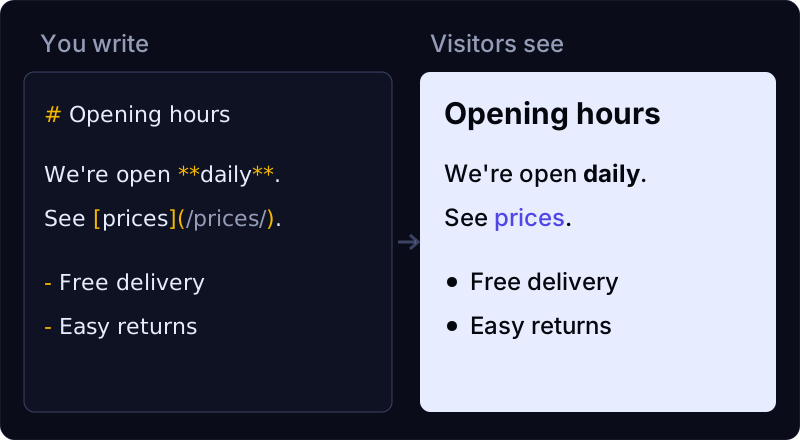 ## Tables, and why "flavors" exist Gruber's original Markdown was deliberately small. It had no tables, for example. Over the years, different tools added their own extras, and small differences crept in: one tool treated an edge case one way, another tool another way. Two efforts tidied this up. **CommonMark** is a detailed specification that pins down how standard Markdown should behave, so the same file renders the same way in different tools. **GitHub Flavored Markdown** (often shortened to GFM) builds on CommonMark and adds extras like tables, ~~strikethrough~~ and links that turn clickable on their own. GitHub's guide to [basic writing and formatting syntax](https://docs.github.com/en/get-started/writing-on-github/getting-started-with-writing-and-formatting-on-github/basic-writing-and-formatting-syntax) is a friendly reference. A table in GFM looks like this: ``` | Day | Hours | | -------- | ------- | | Weekdays | 9 to 5 | | Saturday | 10 to 2 | ``` The pipes don't need to line up perfectly; that's just for your own eyes. Each row needs the same number of columns, and the second line (the dashes) tells the program "the line above is the header." The practical lesson: **check which flavor your tool uses.** The basics (headings, emphasis, links, lists) work almost everywhere. Extras like tables, footnotes and task-list checkboxes vary from tool to tool. ## Frontmatter: the details about the page Most website tools that use Markdown add a small block at the very top of each file, between two lines of `---`. It's called **frontmatter**, and it isn't part of Markdown itself. It holds details _about_ the page rather than the page's text: its title, a short description for search results, the date it was published. YAML ``` --- title: Opening hours description: When our shop is open, including holidays. datePublished: 2026-11-27 --- ``` Frontmatter is usually written in YAML, a format of `name: value` pairs. Two things trip people up. First, the spacing after the colon matters. Second, if a value contains a colon itself (like a title "Markdown: a guide"), wrap it in quotes so the program doesn't get confused. ## Mistakes almost everyone makes once - **Forgetting the blank line.** A list or heading directly under a paragraph, with no empty line between them, can get swallowed into the paragraph in some tools. When in doubt, add a blank line. - **Skipping heading levels.** Jumping from `#` straight to `###` because the smaller text "looks right." Headings are structure, not font sizes. Screen readers and search engines use them as an outline, so go in order. - **More than one `#` title.** Most pages should have exactly one top-level heading. - **Empty or lazy alt text.** `` helps nobody. Say what the photo shows. - **Spaces in link addresses.** `[menu](/our menu/)` breaks. Use hyphens in file and page names: `/our-menu/`. - **Pasting from a word processor.** Curly quotes are fine, but pasted text can bring hidden formatting or odd characters along. Paste as plain text. - **Reaching for HTML to change how things look.** Most Markdown tools let you mix in raw HTML, but styling one paragraph by hand is exactly the kind of thing that makes a site inconsistent later. Ask for a layout change instead. ## Markdown in vagejs We make vagejs, a static site generator, so this is where Markdown meets our own tool. In a vagejs site every page is a Markdown file in `src/pages/`, with frontmatter at the top. `title` is required, and `description` becomes the page's meta description (which search engines may show under your link), its social preview text and its summary in the site's `llms.txt`. The [content authoring docs](https://vagejs.com/docs/content-authoring/) list every field. vagejs reads Markdown with GitHub Flavored Markdown turned on. We checked what that means in practice by building a test page with vagejs 0.3.0 on 24 October 2026: - **Tables, strikethrough and bare web addresses** all came out as proper HTML. - **Task-list checkboxes** (`- [ ]` and `- [x]`) did _not_: the list items stayed, but the checkboxes were removed. That's the safety filter at work, because it strips form elements from page content. If you need checkboxes, use plain bullets with words like "Done". - **Raw HTML** is cleaned before it's published. A `