# Your docs menu is out of date again? Build it from your pages
> Docs sidebars drift when the menu is a separate hand-kept list. Why that happens, and how vagejs builds menus, breadcrumbs and next links from frontmatter.
Docs menus go out of date when the menu is a separate list someone has to remember to edit. Build the menu from the pages instead, with each page's frontmatter saying where it sorts, and a new, renamed or deleted page updates the menu on the next build.
24 October 2026 · 7 min read · by [Venkatesh A G E](#author)
A customer emails support: "Your docs say to see the Backups guide, but I can't find it anywhere." You check. The page exists, it's been live for two weeks, and it's excellent. It's just not in the sidebar, because whoever published it didn't know the menu lived in a different file. Meanwhile the sidebar still lists "Sharing (beta)", which was renamed a month ago and now leads to a 404.
If you look after documentation, a help centre or any site with a section menu, you've probably seen some version of this. The fix isn't more care. It's removing the second list.
## Why do docs menus drift?
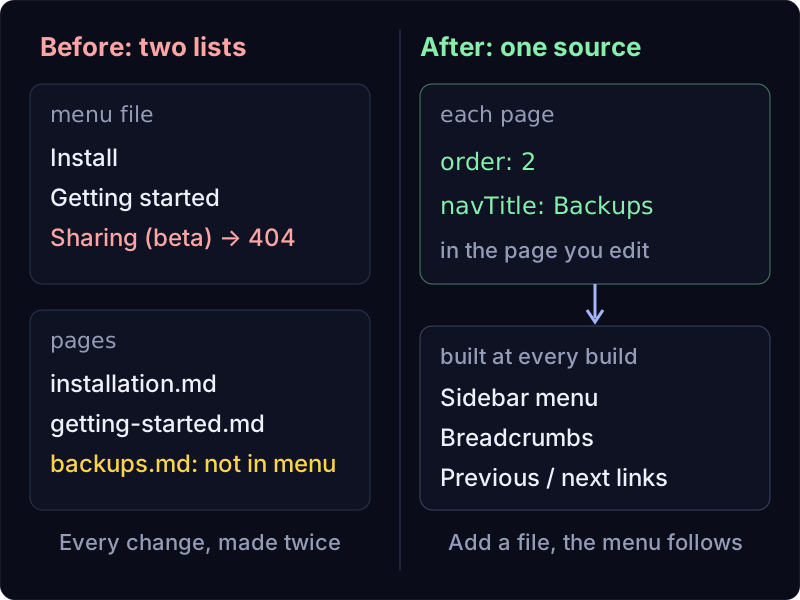
On many sites, the sidebar is a separate list: a config file, a JSON file or a block of HTML in a template. It names each page, its title in the menu and its position. The pages themselves live somewhere else.
That means every change has to happen twice:
- **Add a page**, and you also have to add it to the menu. Forget, and the page is published but impossible to find by browsing.
- **Rename or move a page**, and the menu still points at the old address.
- **Delete a page**, and the menu keeps a link to nothing.
- **Change a title**, and the menu shows the old one.
- **Reorder a section**, and you're editing numbers or moving lines in a file far away from the pages you're thinking about.
Two copies of the same truth will drift apart. It's not a discipline problem; it's arithmetic. The more people (and AI assistants) who edit the docs, the faster it happens, because each of them has to know the second file exists.
## The fix: let each page describe its own place
The menu should be _derived_ from the pages, not maintained next to them. Each page carries the little bit of information the menu needs: where it sorts, and what short label to show. The menu is then built fresh from whatever pages exist at build time.
With that setup:
- A new page appears in the menu the moment it's published.
- A deleted page disappears from the menu because it no longer exists.
- A renamed page shows its new title, at its new address.
- Ordering is decided in the page you're already editing.
Breadcrumbs ("Home / Docs / Guides / Backups") and "previous / next" links come from the same data, so they can't disagree with the menu either.
## How vagejs does it
vagejs is a static site generator: each page is a Markdown file in `src/pages/`, and the folder structure becomes the site's addresses. Since version 0.3, two optional frontmatter fields (the labelled settings at the top of a page) handle navigation:
YAML
```
---
title: Installing the app on your computer
description: How to install the app on Windows, macOS and Linux.
order: 1
navTitle: Install
---
```
- `order` sets the position in a menu, lowest first. Pages without one sort after those with one, then by title.
- `navTitle` is a shorter label for menus and breadcrumbs. Without it, the page title is used.
Layouts (the files that wrap each page in its header, sidebar and footer) receive a list of every published page, and vagejs provides helpers that turn it into navigation:
| Helper | What it gives you |
| --- | --- |
| `tree(pages, "/docs/")` | The section as a nested tree (folders become levels), each level sorted by `order`, then title |
| `breadcrumbs(pages, route)` | The trail from the home page down to the current page |
| `neighbors(list, route)` | The previous and next page in a list |
| `flatten(tree)` | The tree in reading order, for previous / next across nested folders |
| `collection(pages, { under, sort: "order" })` | A flat, sorted list for simpler sections |
### A real sidebar, from start to finish
We tried this on a fresh starter site with vagejs 0.3.0 on 24 October 2026. We added a small docs section: an index page, Install (`order: 1`), Getting started (`order: 2`), a Guides folder (`order: 3`) holding Sharing (`order: 1`) and Backups (`order: 2`), and an FAQ with no order at all. Then we wrote a short docs layout:
TypeScript
```
// src/layouts/docs.ts
import { breadcrumbs, flatten, html, neighbors, raw, tree, type Layout, type TreeNode } from "vagejs";
import defaultLayout from "./default.ts";
const menu = (nodes: TreeNode[]): unknown =>
html`
`;
const layout: Layout = (props) => {
const { pages, page } = props;
const nodes = tree(pages, "/docs/");
const trail = breadcrumbs(pages, page.route);
const { prev, next } = neighbors(flatten(nodes), page.route);
const body = html`
${raw(props.content)}
`;
return defaultLayout({ ...props, content: String(body) });
};
export default layout;
```
Each docs page sets `layout: docs`. After `npm run build`, here's the navigation vagejs wrote into the Backups page (we added line breaks and left out the page text in the middle):
HTML
```
...
```
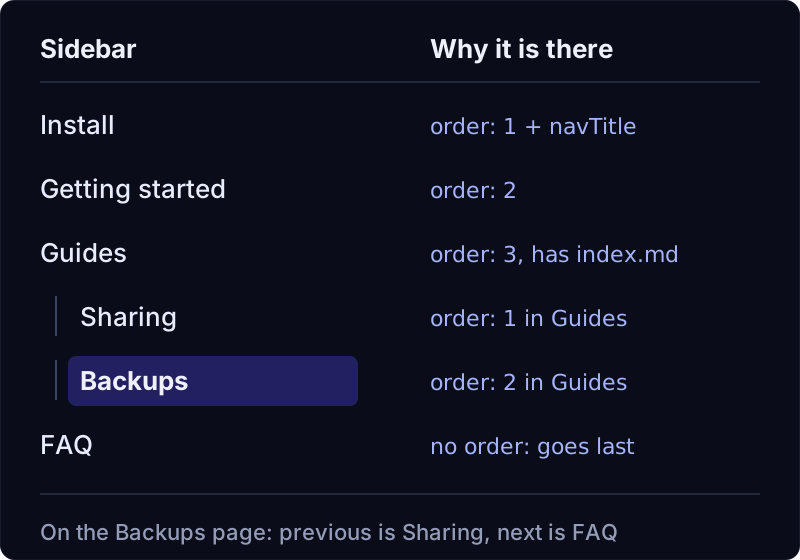
Notice what we never wrote: a list of pages. Install comes first because of `order: 1`. Sharing sits above Backups inside Guides because of its own `order`. The FAQ, with no `order`, lands at the end. The menu says "Install" rather than "Installing the app on your computer" because of `navTitle`. And the "next" link from Backups jumps out of the Guides folder to the FAQ, because `flatten()` follows the same reading order as the sidebar.
Write the layout once. After that, adding a page to the docs means adding a file.
### Mistakes are caught before they're published
Because navigation comes from frontmatter, vagejs checks those fields. We gave a page `order: two` by mistake, and `npx vage check` replied:
```
error page-error src/pages/docs/upgrading.md
Invalid frontmatter:
✖ Invalid input: expected number, received string
→ at order
```
Other mistakes are caught too. A link in the body of a page to an address that doesn't exist fails `vage check`, and so does a link to a draft page. Drafts (`draft: true`) are left out of the page list entirely, so a half-written page never shows up in the menu while it's still visible to you in `npm run dev`.
### Renaming a page without breaking old links
When you rename a docs page, the menu updates itself. Links from elsewhere on the web won't, so add a redirect in `vage.config.ts`:
TypeScript
```
redirects: { "/docs/guides/sharing-beta/": "/docs/guides/sharing/" },
```
`vage check` reports a redirect whose target doesn't exist. The [routing docs](https://vagejs.com/docs/routing/) cover redirects, and [templates and layouts](https://vagejs.com/docs/templates-and-layouts/) cover the helpers in more detail.
### We use it ourselves
The documentation sidebar on this website is built the same way. Each docs page sets `order` and `navTitle`, and the layout lists the section with `collection(pages, { under: "/docs/", includeIndex: true, sort: "order" })`. When we add a docs page, we don't touch the sidebar.
## Limits of a menu built from pages
- **You write the docs layout.** New vagejs sites come with a default layout and a blog layout, not a docs layout. The example above is about twenty lines, and an AI coding assistant can write it from the instructions in `AGENTS.md`, but it's still code someone has to own.
- **Order numbers are still manual.** If you want a new page third, you give it an `order` that puts it third, and sometimes that means renumbering a few neighbours. Leaving gaps (10, 20, 30) helps.
- **Folders need an index page to become a level.** In `tree()`, a folder without its own `index.md` doesn't get a heading; its pages move up a level. That's by design, but it can surprise you.
- **No search.** vagejs builds static pages without JavaScript by default, and there's no built-in docs search.
- **Links to other websites aren't pages.** If your menu should include an external link, such as a status page, you add it to the layout by hand, and its domain needs approving in `links.lock.json`.
- **Content can still go stale.** A menu built from pages is always accurate about which pages exist. Whether what they say is still true is up to you.
## Build a docs menu that updates itself
You need Node.js 22.12 or newer:
terminal
```
npm create vagejs@latest my-docs
cd my-docs
npm install
npm run dev
```
Make a `src/pages/docs/` folder with a few pages, give them `order` and `navTitle`, and ask your AI assistant: "Add a docs layout with a sidebar from `tree(pages, "/docs/")`, breadcrumbs and previous/next links, as described in AGENTS.md." Then run `npm run check`. The [getting started guide](https://vagejs.com/docs/getting-started/) and our [prompt library](https://vagejs.com/prompts/) will help with the rest.
## Self-updating docs menus at a glance
- Docs menus drift because they're a second copy of information that already lives in the pages.
- Build the menu from the pages instead: each page states its `order` and an optional short `navTitle`.
- In vagejs, `tree()`, `breadcrumbs()`, `neighbors()` and `flatten()` turn that into a sidebar, a trail and previous/next links at every build.
- Invalid fields fail `vage check`, drafts stay out of menus, and redirects keep renamed pages reachable.
- You still write the layout once and pick the numbers. After that, a new page is just a new file.

Written by
Venkatesh A G E
Web developer in Bengaluru, India, and the maker of vagejs. Helps startups turn their websites into a real source of customers, with a focus on clarity, technical SEO and AI search.
[LinkedIn](https://www.linkedin.com/in/ageven/)[About](https://vagejs.com/about/)