# Build a documentation site with vagejs
> A step-by-step guide to a docs site in vagejs, with a sidebar, breadcrumbs and previous/next links built from frontmatter, plus redirects and Markdown copies.
You can build a documentation site with vagejs from Markdown pages alone: each page's frontmatter sets its place in the sidebar, and the layout builds the menu, breadcrumbs and "Next" links from the pages themselves. This walkthrough builds one step by step.
1 November 2026 · 7 min read · by [Venkatesh A G E](#author)
Documentation has a habit of drifting. Someone adds a page and forgets the menu. Someone renames a page and every old link breaks. Six months later the sidebar lists a guide that was deleted and misses two that exist. In this walkthrough we'll build a small docs site with vagejs where the menu, the breadcrumbs and the "Next" links all come from the pages themselves, so there's nothing separate to forget.
Everything below was run on vagejs 0.3.0. The terminal output is real; only local paths are shortened.
## What we're building
A docs section for a made-up command-line tool called Acme. It has a docs home page, two top-level pages (installation and configuration), and a "Guides" folder with two guides inside. Each page gets:
- a sidebar that shows the whole section, nested by folder, in the order you choose
- a breadcrumb trail, like Home / Docs / Guides / Deploying
- previous and next links at the bottom, in sidebar order
## Step 1: Create the site
You'll need Node.js 22.12 or newer. Then:
terminal
```
npm create vagejs@latest acme-docs
cd acme-docs
npm install
npm run dev
```
The dev server prints a local address. Leave it running; it reloads the browser each time you save a file. If you're new to the project layout, [getting started](https://vagejs.com/docs/getting-started/) walks through it.
## Step 2: Write the pages
In vagejs every Markdown file in `src/pages/` is a page, and its path is its address. So the folder structure _is_ the docs structure:
```
src/pages/docs/
├── index.md → /docs/
├── installation.md → /docs/installation/
├── configuration.md → /docs/configuration/
└── guides/
├── index.md → /docs/guides/
├── first-project.md → /docs/guides/first-project/
└── deploy.md → /docs/guides/deploy/
```
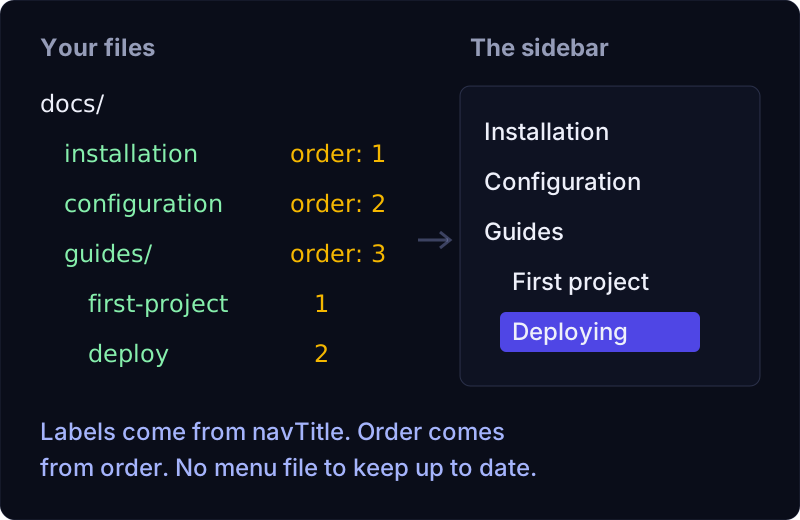
Each page starts with a little block of settings called frontmatter. Two fields matter for navigation: `order` (lower numbers come first) and `navTitle` (a shorter label for menus and breadcrumbs, so a page can have a full title like "Installing the Acme CLI" but show up as "Installation" in the sidebar). Here's `src/pages/docs/installation.md`:
```
---
title: Installing the Acme CLI
navTitle: Installation
description: How to install the Acme command-line tool on macOS, Windows and Linux, and check that it works.
layout: docs
order: 1
---
# Installing the Acme CLI
Install it with npm.
```
The configuration page gets `order: 2`, and `guides/index.md` gets `order: 3`. Inside the guides folder, numbering starts again: `first-project.md` is `order: 1` and `deploy.md` is `order: 2`. Each level is sorted on its own, so you never have to renumber the whole site when you add a page somewhere.
Pages without an `order` go to the end of their level, sorted by title. That's a handy default for a long list of reference pages where alphabetical is fine.
## Step 3: Write the docs layout
A layout is a TypeScript file in `src/layouts/` that wraps each page in HTML. Every page above says `layout: docs`, so create `src/layouts/docs.ts`:
TypeScript
```
import { breadcrumbs, flatten, html, neighbors, raw, tree, type Layout, type SafeHtml, type TreeNode } from "vagejs";
import defaultLayout from "./default.ts";
const menu = (nodes: TreeNode[], current: string): SafeHtml =>
html`
`;
const layout: Layout = (props) => {
const { pages, page } = props;
const nav = tree(pages, "/docs/");
const { prev, next } = neighbors(flatten(nav), page.route);
const trail = breadcrumbs(pages, page.route);
const body = html`
${raw(props.content)}
`;
return defaultLayout({ ...props, content: String(body) });
};
export default layout;
```
That's the whole thing. Four helpers from vagejs do the work:
- **`tree(pages, "/docs/")`** turns every page under `/docs/` into a nested list. Folders become levels, and each level is sorted by `order`, then by title. A folder needs its own `index.md` to become a level; without one, its pages move up a level.
- **`flatten()`** lays that tree out in reading order (each page, then its children), which is exactly the order you want for previous and next links.
- **`neighbors(list, page.route)`** finds the page before and after the current one in that list.
- **`breadcrumbs(pages, page.route)`** builds the trail from the home page down, skipping any level that has no page.
`p.label` is the page's `navTitle`, or its title if there's no `navTitle`. The `html` tag escapes every value you put in, so a title with a `<` in it can't break the page. `raw()` is only for HTML you trust, such as the already-sanitized page content. The layout then hands everything to the starter's `default.ts`, so the docs pages share the site's header and styles. More on this in [templates and layouts](https://vagejs.com/docs/templates-and-layouts/).
On the "Deploying" guide, the built page contains this (from our own build):
HTML
```
```
And at the bottom, a "Previous: First project" link, with no "Next" because it's the last page in the sidebar.
## Step 4: Let the checker catch broken links
Docs are full of links between pages, which is where they break first. Say you link to `/docs/install/` when the page is `/docs/installation/`. Run the check:
terminal
```
npx vage check
```
```
warning config site
"site" is still the placeholder https://example.com; canonical URLs and sitemap.xml will point there. Set your real origin.
error link-broken /docs/ (src/pages/docs/index.md)
Link to "/docs/install/" does not match any page or file.
Checked 11 page(s): 1 error(s), 1 warning(s).
Passing checks do not guarantee indexing, rankings, rich results or AI citations.
```
The error names the page, the source file and the bad link. The warning is a reminder that the starter's `site` setting is still a placeholder; set your real address in `vage.config.ts` before you publish.
The check also fails on a link to a page that still has `draft: true`, because drafts aren't published. That's useful when you're writing several pages at once: you can't accidentally ship a link to a page that isn't there yet. The full list of checks is on [checking your site](https://vagejs.com/docs/checks/).
## Step 5: Rename a page without breaking links
Six months in, "Configuration" becomes "Settings". Move the file from `configuration.md` to `settings.md`, then tell vagejs about the old address in `vage.config.ts`:
TypeScript
```
redirects: { "/docs/configuration/": "/docs/settings/" },
```
The build then writes a small page at the old address that sends visitors on to the new one. That page is marked `noindex` and points its canonical link at the new address, so search engines are told where the content went. If you deploy to Cloudflare, vagejs also writes the redirect into a `_redirects` file, which Cloudflare serves as a real 301 redirect. If you mistype the new address, `vage check` fails with a `redirect-target` error instead of shipping a redirect to nowhere. [Routing](https://vagejs.com/docs/routing/) has the details.
## Step 6: Help AI tools read your docs
People increasingly paste docs into AI assistants, or let coding agents read them directly. vagejs can make that easier with two settings:
TypeScript
```
seo: {
markdownCopies: true,
llmsTxt: { full: true },
},
```
`markdownCopies` publishes a plain Markdown copy of every listed page next to it, so `/docs/settings/` also exists as `/docs/settings.md`. The copy is made from the page's content, not the layout, so it has no sidebar or menus, just the text. Each page links to its copy, and `llms.txt` links to the copies too. `llmsTxt: { full: true }` adds `llms-full.txt`, one file with the Markdown of every listed page.
A fair word of caution: `llms.txt` is an emerging convention, and there's no guarantee a given AI tool reads it. It costs nothing to publish, which is why we like it, but it isn't a ranking lever. [SEO and AI search](https://vagejs.com/docs/seo/) explains what each generated file does.
If your docs live in git, `seo: { lastmod: "git" }` also dates each page in `sitemap.xml` from its last commit, which is usually more honest than a date someone remembered to type.
## Where this approach has limits
A few things to know before you commit to it:
- **There's no built-in search box.** vagejs ships no JavaScript by default, and search needs some. You can add a search script in your layout, but it's your code and your page weight.
- **One section per `tree()` call.** For several separate sidebars (say, `/docs/` and `/api/`), call `tree()` once for each.
- **No versioned docs.** There's no built-in way to keep "v1" and "v2" docs side by side. You can keep versions in separate folders by hand. Translations are a different story: sites in several languages are supported since 0.10, with hreflang links and checks for missing translations. See [multi-language sites](https://vagejs.com/features/multi-language-sites/).
- **Layouts are code.** The layout above is about twenty lines of TypeScript. If that's not your thing, an AI coding agent can write and adjust it; every vagejs site includes an `AGENTS.md` that describes these helpers. See our [agent guides](https://vagejs.com/agents/).
## The docs site recipe in brief
- Folders are your docs structure. `order` and `navTitle` in each page's frontmatter control the menu.
- `tree()`, `flatten()`, `neighbors()` and `breadcrumbs()` build the sidebar, previous/next links and breadcrumbs from your pages, so the menu can't go out of date.
- `npx vage check` catches broken links and links to drafts before you publish.
- Renames get a line in `redirects`, and `vage check` makes sure the redirect lands somewhere real.
- `markdownCopies` and `llms-full.txt` give AI tools a clean, text-only version of your docs.
If you'd like to try it, `npm create vagejs@latest` gets you a starter site in a minute, and [the docs](https://vagejs.com/docs/) cover the rest.

Written by
Venkatesh A G E
Web developer in Bengaluru, India, and the maker of vagejs. Helps startups turn their websites into a real source of customers, with a focus on clarity, technical SEO and AI search.
[LinkedIn](https://www.linkedin.com/in/ageven/)[About](https://vagejs.com/about/)